
Five Elementor alternatives for WordPress sites that keep breaking after updates, what each costs in 2026 and how block-based and standalone builders handle core releases differently.
In September 2026, a site owner on Reddit updated Elementor to version 4.3.1 and watched their carousels fall apart. The Loop Carousel showed one post instead of many, the arrows stopped responding and autoplay quit. Rebuilding the carousel from scratch didn’t help, and only reverting to the older version fixed it. That week, Elementor shipped versions 4.3.0, 4.3.1 and 4.3.2 on three consecutive days. If your maintenance routine has become “update, check, roll back,” you’re not alone. Some Elementor alternatives are built to ask less of you after every release.
The best Elementor alternatives for WordPress sites tired of update breakage in 2026 are:
- GenerateBlocks: best for lean block-based sites with few moving parts
- Kadence Blocks: best for Elementor-style widgets inside the block editor
- Beaver Builder: best for client sites where stable updates matter most
- Bricks: best for developers who want speed and a lifetime license
- Breakdance: best for a familiar drag-and-drop feel with a free plan
Quick Picks
| Builder | Best For | Type | Starting Price | Free Version |
|---|---|---|---|---|
| GenerateBlocks | Lean block-based sites | Block editor plugin | $99/year for Pro | Yes |
| Kadence Blocks | Widget variety in blocks | Block editor plugin and theme | $99/year | Yes |
| Beaver Builder | Stable client sites | Standalone builder plugin | $89/year | Yes (Lite) |
| Bricks | Developers | Theme with its own builder | $79/year or $599 lifetime | No (demo playground) |
| Breakdance | Elementor-like editing | Standalone builder plugin | $99.99/year | Yes |
Table of Contents
Why builder sites break after WordPress updates
Every WordPress site built with a page builder has two moving parts: WordPress core and the builder. Both changed a lot in 2026. WordPress 7.0 “Armstrong” arrived on May 20, 2026 with a redesigned dashboard and new AI features, and WordPress 7.1 followed in August. Two days after 7.0 landed, a Reddit user said an automatic update had added strange borders across their pages. Commenters traced it to a styling change: a border width set without a color now showed up in black. Others said the separator block had turned thick and wide.
Builders have to keep pace. The Elementor Pro changelog shows a version 4.2.3 release on August 31, 2026 whose only change was updated compatibility with WordPress 7.1. Elementor is also mid-transition to its version 4 “Atomic” editor. When one user reported a WordPress 7.0 and Elementor Pro “conflict” in May 2026, the culprit turned out to be the new Atomic Form widget.

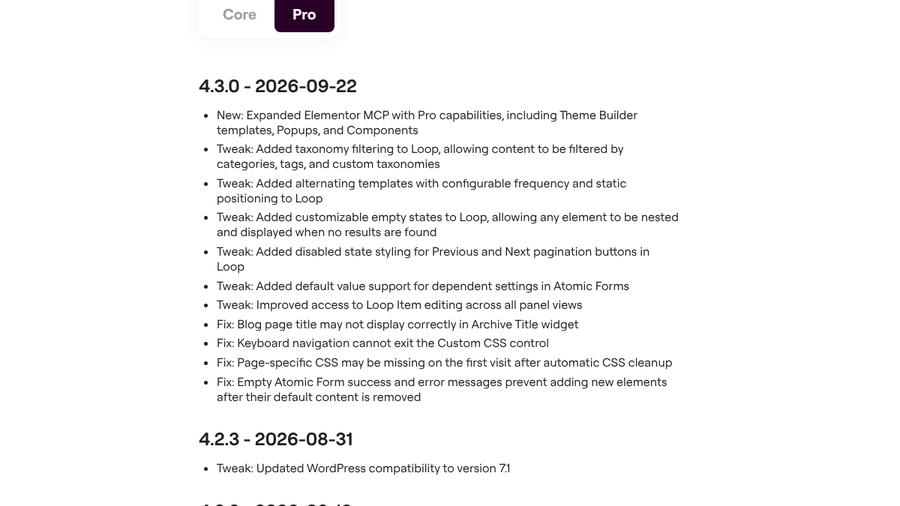
No builder is immune, and sites built on core blocks can feel changes like those in WordPress 7.0 too. The goal is fewer moving parts, slower release churn and an easy way back when something breaks. Before you switch, try Elementor’s own rollback tool under the Version Control tab in its Tools panel. It can buy you time while you plan a move.
1. GenerateBlocks
Best for: Site owners who want lean pages built on WordPress’s own block editor.
GenerateBlocks describes itself as a small collection of lightweight WordPress blocks that can accomplish nearly anything. Instead of dozens of single-purpose widgets, you learn a handful of flexible blocks deeply and combine them into layouts. It comes from the team behind the GeneratePress theme, and the two are often used together.
The free plugin is well established. On WordPress.org it has more than 200,000 active installs and a 4.9 out of 5 rating. Version 2.4.1 was released in August 2026 and is tested up to WordPress 7.1.2. That’s the kind of signal to check for any plugin you plan to rely on for years.
Because GenerateBlocks works inside the block editor, you aren’t running a second editor on top of WordPress. That removes a whole category of conflicts between a builder’s editor and core. The trade-off is that core changes reach you directly. The styling surprises users reported after WordPress 7.0 came from core blocks, which is exactly where GenerateBlocks lives. The upside is fewer layers to troubleshoot when something does break.
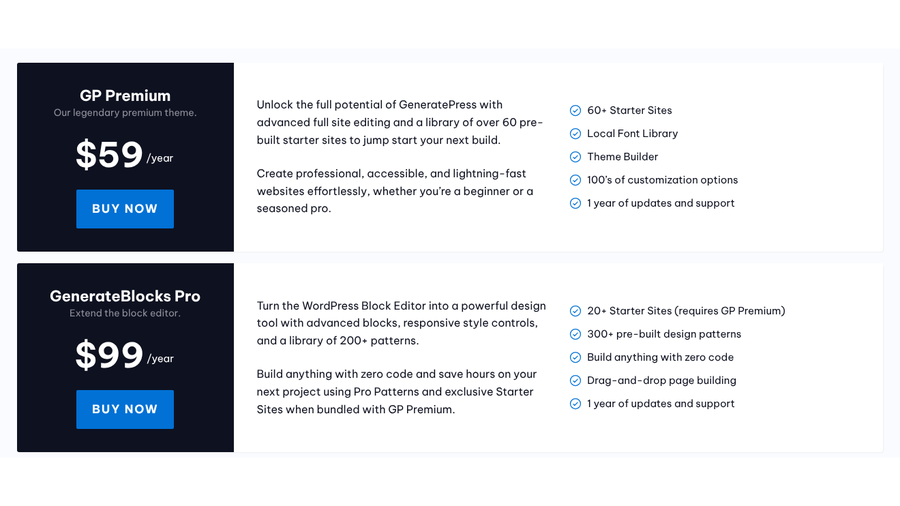
GenerateBlocks Pro adds advanced blocks, responsive style controls and a library of pre-built design patterns. Pair it with GP Premium, the premium version of the GeneratePress theme, for starter sites and a theme builder.
Expect a learning curve if you’re used to Elementor’s widget panel. You’ll build more from containers and less from ready-made pieces like pricing tables or testimonial sliders. For a brochure site or a blog, that’s often an advantage. For a marketer who wants to drag in a countdown timer without thinking, it may feel bare.
- Pros: Lightweight blocks in the native editor, a strong free version and a GeneratePress bundle for theme control.
- Cons: Fewer ready-made widgets than Elementor, and core block changes affect it directly.
Pricing: Free on WordPress.org. GenerateBlocks Pro is $99 a year, GP Premium is $59 a year and the GeneratePress One bundle is $149 a year.
2. Kadence Blocks
Best for: Elementor users who want familiar widgets without leaving the block editor.
If GenerateBlocks feels too minimal, Kadence sits closer to Elementor’s widget-rich approach while staying inside the block editor. The free Kadence Blocks plugin adds Row Layout and Section blocks for structure, plus Advanced Button, Advanced Form and Advanced Gallery blocks for carousels and sliders.
It’s widely used. WordPress.org lists more than 600,000 active installs and a 4.8 out of 5 rating. Version 3.7.11.1 came out on September 22, 2026 and is tested up to WordPress 7.1.2. Kadence is now sold through Liquid Web, which bundles it with its theme and other plugins.
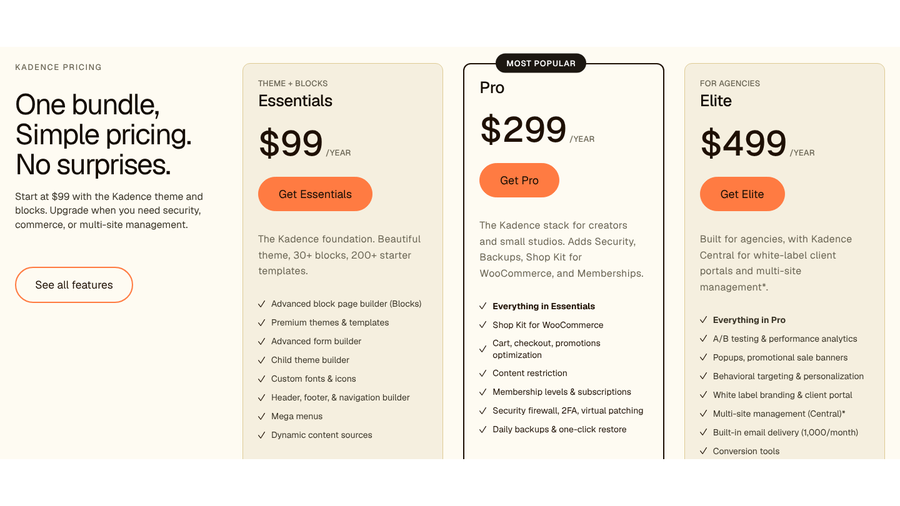
The Essentials plan covers the Kadence theme and blocks, with 30-plus blocks and more than 200 starter templates. It also includes a header, footer and navigation builder, mega menus and dynamic content sources. That combination replaces much of what people use Elementor Pro’s Theme Builder for. The Pro plan adds WooCommerce tools, memberships, a security firewall and daily backups with one-click restore. Elite adds multi-site management for agencies.
Because Kadence lives in the block editor, it shares GenerateBlocks’ trade-off: fewer editor conflicts, but direct exposure to core block changes. A larger block library also means more code to keep updated. On the plus side, pages built from standard WordPress blocks mixed with Kadence blocks are easier for the next developer to understand than a fully proprietary layout. Our explainer on block themes vs classic themes covers how that choice affects future updates.
- Pros: Elementor-style blocks in the native editor, a popular free plugin and a bundle with backups at the Pro level.
- Cons: A bigger block library to maintain, and paid features are sold as annual bundles.
Pricing: Free on WordPress.org. Paid plans are $99 a year for Essentials, $299 for Pro and $499 for Elite.
3. Beaver Builder
Best for: Agencies and freelancers who value predictable updates over the newest features.
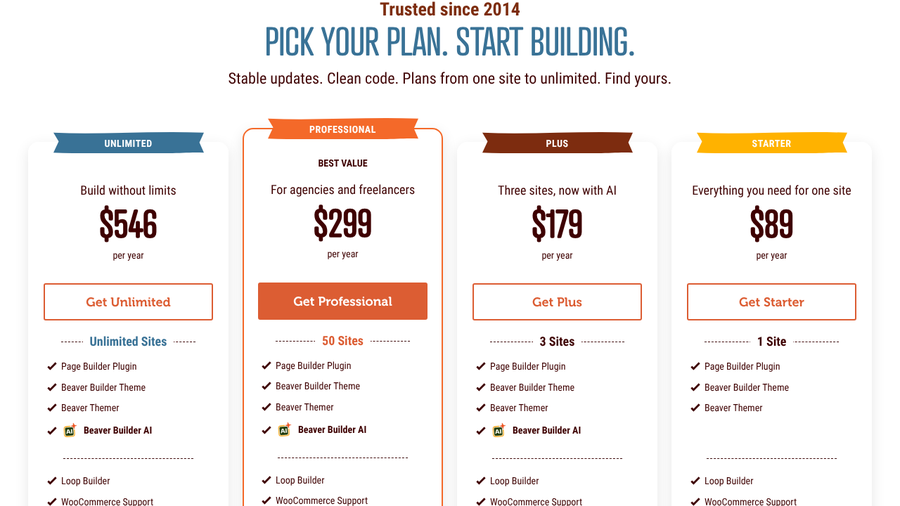
Beaver Builder has been around since 2014, and its pricing page leads with “Stable updates. Clean code.” That’s a fair summary of its reputation. It uses its own front-end drag-and-drop editor, separate from the block editor, so pages look and edit much as they do in Elementor.
The free Beaver Builder Lite on WordPress.org has more than 100,000 active installs and a 4.7 out of 5 rating. Version 2.11.0.6 was released September 25, 2026 and is tested up to WordPress 7.1.2. The paid version adds premium modules, pre-built templates, advanced styling, conditional logic and dynamic content. Every paid plan includes the Beaver Themer add-on for headers, footers and archive layouts, and Beaver Builder AI starts with the Plus plan.
Two details help with update safety. Every plan includes unlimited staging sites, so you can test a new release on a copy of your site without buying extra licenses. Beaver Builder also stores layout revisions in WordPress’s native revision system, and you can restore an earlier published version of a page from the Tools menu. There’s also a 30-day refund window if it doesn’t fit.
The trade-off is flair. Beaver Builder has a smaller library of design widgets and effects than Elementor, and some agencies add third-party module packs to fill the gap. Those add-ons bring their own update schedules, so keep them to a minimum if stability is the reason you’re switching.
- Pros: A long track record with stable updates, unlimited staging sites on every plan and an editing style that feels familiar after Elementor.
- Cons: Fewer built-in design widgets, and the unlimited plan is the most expensive here.
Pricing: $89 a year for one site and $179 for three sites with AI features. Professional covers 50 sites for $299, and Unlimited costs $546 a year.
4. Bricks
Best for: Developers and technical site owners who want fast, clean output.
Bricks is a theme with its own visual builder rather than a plugin. You install it as your theme, and it runs its own editor, separate from the block editor. All plans include more than 110 elements, a query loop builder, a popup builder, a WooCommerce builder and conditions with interactions.
Bricks is moving quickly. Version 2.4 arrived on September 16, 2026. It added AI-assisted site editing, a new media browser, global data transfers and WooCommerce setup tools. A 2.4.1 fix release followed on September 22. That pace is great for features, but a major Bricks release deserves the same staging test as a major Elementor one.
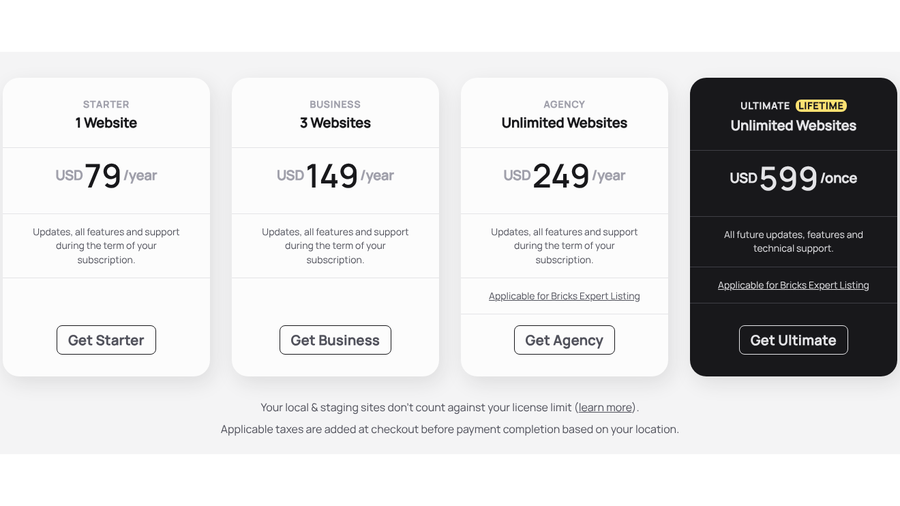
Licensing is friendly to careful updaters. Bricks says local and staging sites don’t count against your license limit, so testing costs nothing extra. It also offers a one-time Ultimate lifetime license, which removes the renewal pressure some owners feel with annual builders. Rolling back means uploading an older version of the theme, and page revisions are available inside the builder. A free online playground lets you try the editor before buying.
The catch is complexity. In June 2026, a Reddit user said Bricks was “a lot more complicated than I need” for a portfolio and small shop and asked whether Breakdance was a better fit. Bricks assumes you’re comfortable with CSS concepts like classes and flexbox, which is why developers love it and beginners sometimes bounce off.
- Pros: Fast output from its own editor, free staging and local installs, and a lifetime license option.
- Cons: A steep learning curve for non-developers, no free version and a theme-level commitment.
Pricing: $79 a year for one site, $149 for three sites or $249 for unlimited sites. The Ultimate lifetime plan costs $599 once. All plans have a 60-day money-back guarantee.
5. Breakdance
Best for: Elementor users who want a similar visual editor and a free plan to test with.
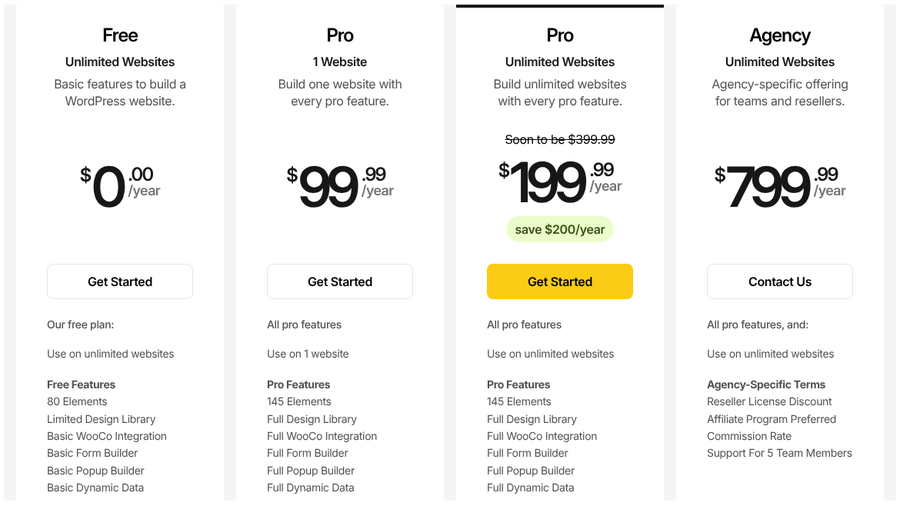
Breakdance, from the WordPress developer Soflyy, is a standalone builder plugin with a drag-and-drop editor that will feel familiar to Elementor users. The free plan works on unlimited websites and includes 80 elements. It also covers basic WooCommerce integration, a basic form builder, a basic popup builder and basic dynamic data.
Pro adds 145 elements, the full design library and full WooCommerce, form and popup builders. It also adds a CSS class manager, conditions, element presets and the option to write your own code. You can use a Pro license on sites you build for clients without them buying their own. Breakdance says more than 18,000 creators use it.
Its pricing policy is unusual and useful for long-term planning. Breakdance promises to lock in the price you sign up at, so renewals don’t jump after a discounted first year. The pricing page shows the unlimited Pro plan at $199.99 a year and says it will soon cost $399.99. Signing up now keeps the lower renewal rate, according to Breakdance. There’s also a 60-day money-back guarantee.
For update stability, Breakdance has the same basic setup as Elementor: a plugin with its own editor running on top of WordPress. It is not on WordPress.org, so you won’t see public install counts or “tested up to” data there. Test it on a staging copy of one real site before committing a whole client roster.
- Pros: A free plan for unlimited sites, an Elementor-like editing experience and renewal prices locked at signup.
- Cons: A smaller ecosystem than Elementor, no WordPress.org listing and a plugin setup that needs the same staging discipline.
Pricing: Free for unlimited sites. Pro costs $99.99 a year for one site or $199.99 for unlimited sites, and Agency is $799.99 a year.
How to move to Elementor alternatives without breaking your site
- Stabilize first. Roll Elementor back to the last version that worked and turn off automatic updates for it while you plan.
- Build on staging. Rebuild templates and key pages on a staging copy. Layouts don’t move cleanly between builders, so plan to rebuild rather than convert.
- Move page by page. Keep Elementor active until the last page is rebuilt, and keep your URLs the same or add redirects.
- Delete what you no longer use. Once you’re done, remove Elementor and its add-ons instead of leaving them deactivated. Our guide to inactive WordPress plugins explains why.
How We Chose These
We looked for WordPress builders that a current Elementor user could move to in 2026 without leaving WordPress. We included both block-based options and standalone visual builders, since each handles core updates differently. For every builder, we checked current pricing on the official site. Where a free version exists on WordPress.org, we also checked recent release dates, active installs and compatibility with the latest WordPress version. We gave weight to staging-friendly licensing, rollback and revision options, and signs of a steady release history. We also read recent user discussions to understand real switching pain points.
The Bottom Line
If update breakage is the main reason you’re leaving Elementor, reduce moving parts. GenerateBlocks or Kadence Blocks keep you in the block editor, and Beaver Builder offers a familiar visual editor with a stable track record. Developers who want speed and a lifetime license should look at Bricks. Choose Breakdance if you want an Elementor-like editor with a free plan. Whatever you pick, test every major release on staging before it reaches your live site.
Frequently Asked Questions
What is the best Elementor alternative?
The best Elementor alternative depends on how you build. GenerateBlocks and Kadence Blocks are best for block-editor sites, Beaver Builder is best for stable client work and Bricks is best for developers who want speed.
Is there a free alternative to Elementor?
Yes. GenerateBlocks, Kadence Blocks and Beaver Builder Lite all have free versions on WordPress.org. Breakdance also offers a free plan for unlimited sites, and WordPress’s own block editor is free.
Why does my Elementor site break after updates?
Elementor sites can break after updates when WordPress core, Elementor Core and Elementor Pro change at different times. New features, add-ons and cached styles can also clash. Test updates on a staging site first.
Can I roll back an Elementor update?
Yes. Elementor has a rollback tool under the Version Control tab in its Tools panel. It lets you reinstall an earlier version while you troubleshoot. Back up your site before rolling back.
Is Bricks better than Elementor?
Bricks is often faster and cleaner than Elementor for developers, and it offers a lifetime license. Elementor is easier for beginners and has a larger ecosystem, so the better choice depends on your comfort with CSS.