
What “our systems have detected unusual traffic” means, why CAPTCHAs keep appearing, and what to check before turning on a VPN or iCloud Private Relay.
In late September 2026, Reddit filled up with the same complaint. One Android user said every Google search had triggered an “unusual traffic” CAPTCHA for about a month, on home Wi-Fi and mobile data alike, with no VPN and cookies already cleared. An Edge user said the message started right after the browser updated to version 154. Another wanted to know if it was widespread or aimed at them personally. It is not personal. That message, “Our systems have detected unusual traffic from your computer network,” usually means something about your connection looks automated. Here is how to figure out what.
The Short Version
Google shows the unusual traffic message when a network you use, including a VPN, seems to be sending automated searches. Solving the CAPTCHA usually clears it. If it keeps coming back, the usual cause is an IP address you share with other people through a VPN, iCloud Private Relay or a busy school or office network. Malware is the other suspect. Try without the VPN or relay, scan for malware and check extensions. And never follow a “verification” that asks you to paste a command.
Table of Contents
What “our systems have detected unusual traffic” means
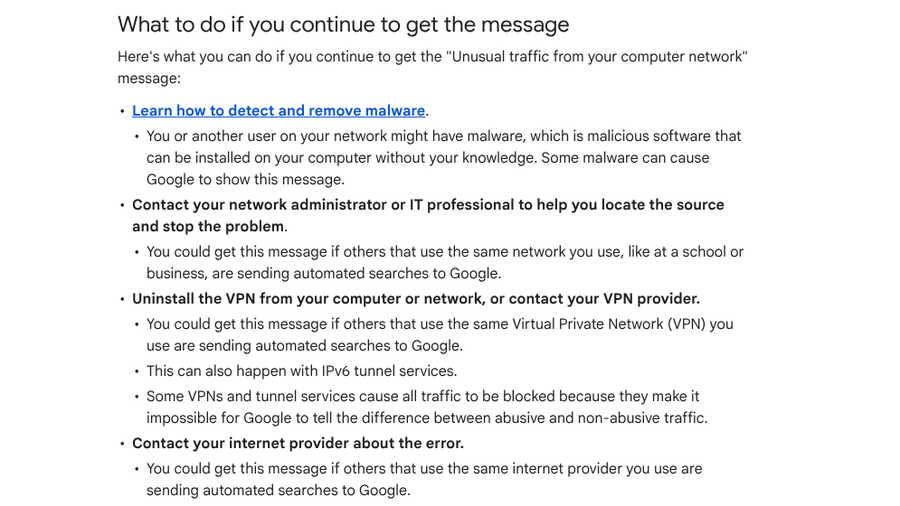
Google’s help page on the “Unusual traffic from your computer network” message explains that it appears when a network you use, including a VPN, seems to be sending automated traffic to Google Search. The message most likely shows a reCAPTCHA. Solve it and you can search again.
If it keeps returning, Google lists four likely sources: malware on your device or another device on your network, other people on a shared school or business network sending automated searches, other users of the same VPN doing the same, or other customers of your internet provider. It adds that some VPNs and tunnel services can cause all traffic to be blocked, because they make it impossible to tell abusive traffic from normal traffic.

Why CAPTCHAs are showing up more often
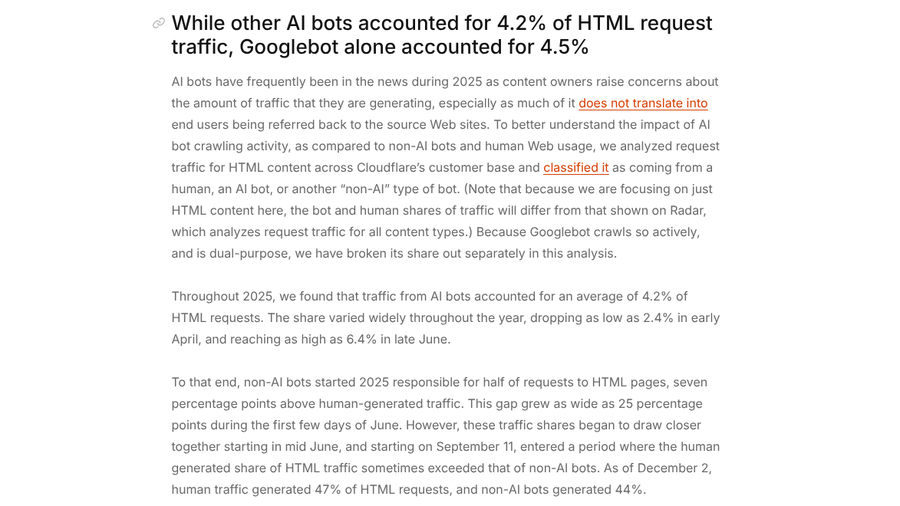
There is no public count of how often real people get stuck in CAPTCHA loops, but bot traffic explains why sites are so suspicious. Cloudflare’s 2025 Radar Year in Review analyzed requests for web pages across its customers:
- Bots started 2025 ahead of people. Non-AI bots made up about half of requests for HTML pages, seven percentage points more than human traffic.
- The gap got wider before it closed. It reached 25 percentage points in early June. By December 2, humans generated 47% of HTML requests and non-AI bots 44%.
- AI crawlers added more. Other AI bots accounted for 4.2% of HTML requests, and Googlebot alone for 4.5%.
When roughly half of the requests hitting a site come from software, bot filters get stricter, and people who share an IP address with bots get caught in the net.
7 common causes of a CAPTCHA loop
1. A VPN shares your address with strangers
Most consumer VPNs put many users behind the same IP addresses. If any of them run automated searches, Google may challenge everyone on that address. Disconnect the VPN and search again. If the CAPTCHA disappears, try a different server or ask your provider about a dedicated IP.
2. iCloud Private Relay hides your IP
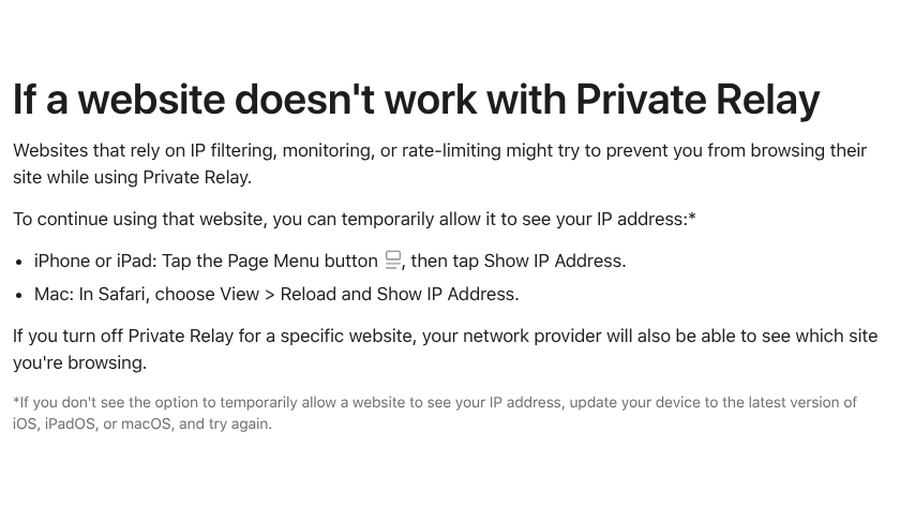
Apple’s page on managing iCloud Private Relay says websites that rely on IP filtering, monitoring or rate-limiting may try to block you while it is on. You can let one site see your IP address: on iPhone, tap the Page Menu button and choose Show IP Address; on a Mac, choose View, then Reload and Show IP Address in Safari. Our guide to sites breaking in Safari with Private Relay has more options.
3. You are on a busy shared network
Schools, offices, dorms and some internet providers put many people behind one public address. Google says you may see the message if others on the same network send automated searches. Switching to mobile data is a quick test. If the CAPTCHA disappears, the network is the issue, and its administrator is the person to tell.
4. Malware or a noisy extension is making requests
Google names malware as a possible cause, since some malicious software sends searches in the background. Run a malware scan and review browser extensions, especially new ones that promise coupons, downloads or search tweaks. Disable them one at a time and test.
5. You start every session with no cookies
Private and Incognito windows begin with a blank slate. Several Reddit users in 2026 said they got a CAPTCHA on the first search in every new Incognito window but not in normal ones. An Edge user also noticed Google stopped challenging them once they stayed signed in with session cookies. If you clear cookies constantly, expect more checks.
6. A browser update changed something
Sometimes the timing gives it away. The September 2026 Edge users traced their problems to an update, and in June 2026, a Vivaldi user said a Cloudflare “prove you are human” check looped endlessly after an update but worked in Edge. That user said a later Vivaldi update fixed it. Try another browser, and update again if a fix is released.
7. Your privacy settings are stricter than the site expects
Blocking JavaScript or third-party scripts can break the checks themselves. Google notes that if you don’t see a reCAPTCHA, you should confirm your browser is supported and JavaScript is on. Our recent guide to the private Wi-Fi address setting on iPhone covers another privacy feature that can confuse networks.
What to ask before turning on a VPN or Private Relay
- Does the VPN offer a dedicated IP? A personal address avoids sharing a reputation with other users.
- Can you exclude specific sites or apps? Split tunneling lets banking or search traffic skip the VPN.
- Is Automatic Verification on for your Apple devices? Cloudflare says Apple’s Private Access Tokens, available since iOS 16 and macOS 13, let supported devices prove they are human without a CAPTCHA on sites using its Managed Challenge. The toggle sits in your Apple Account’s password and security settings.
- How often will you need to switch it off? If it is several times a day, a per-site exception may beat turning privacy off entirely.
Watch out for fake CAPTCHAs
Scammers now copy these checks. In an August 2026 report, Microsoft described a campaign that shows a fake Cloudflare “Verify you are human” overlay on hacked websites. It silently copies a malicious command to your clipboard and tells you to paste it into Windows Terminal or PowerShell. In February 2026, a Reddit user described a “Cloudflare-looking” page that told them to press Win+R, then Ctrl+V and Enter. They closed it.
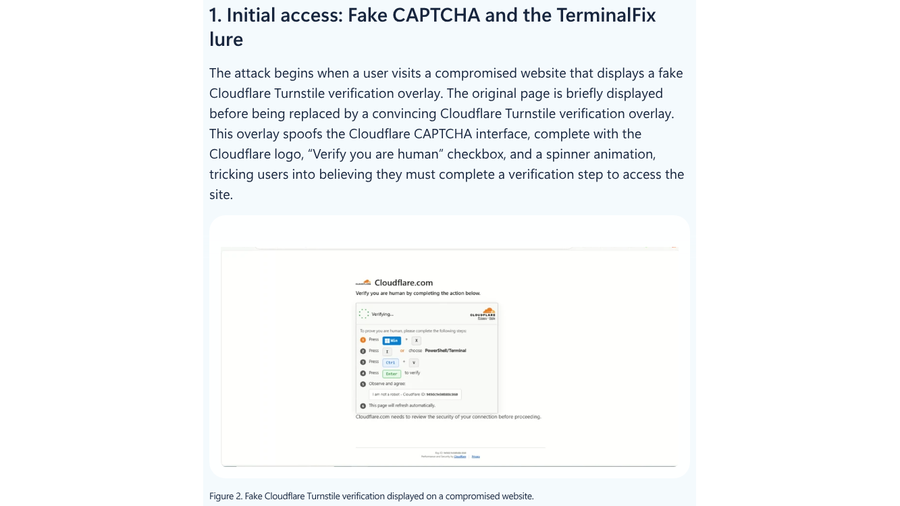
A real CAPTCHA asks you to click, tick a box or pick images. It never asks you to open a Run box, a terminal or a command prompt. If you already pasted a command, disconnect from the internet, run a full malware scan and change passwords from another device. If you run a website and legitimate visitors keep getting blocked, our roundup of reCAPTCHA alternatives that stop blocking real users can help.
What Matters Most
- Google’s unusual traffic message means your network looks automated, often because you share an IP address with others.
- VPNs, iCloud Private Relay, busy shared networks and malware are the most common triggers.
- Test by switching networks or pausing the VPN, then fix the specific cause.
- No real CAPTCHA asks you to paste or run a command.
Frequently Asked Questions
Why do I keep getting CAPTCHAs on Google?
You keep getting CAPTCHAs on Google when your network seems to send automated traffic, often because a VPN, iCloud Private Relay or shared network gives you the same IP address as other users. Malware and some browser setups can also trigger it.
How do I get rid of “our systems have detected unusual traffic”?
Solve the CAPTCHA first. If the message keeps returning, turn off your VPN or Private Relay, switch to another network, scan for malware and disable recent browser extensions. If it only happens on one network, contact that network’s administrator or your internet provider.
Does iCloud Private Relay cause CAPTCHAs?
iCloud Private Relay can cause more CAPTCHAs, because sites that rely on IP filtering or rate-limiting may treat relayed traffic as suspicious. Apple lets you show your real IP address to a specific site instead of turning Private Relay off completely.
How do I fix a Cloudflare “verify you are human” loop?
Try another browser, update the one you use, and turn off VPNs and aggressive extensions for that site. Clearing that site’s cookies can also help. If the loop only happens in one browser after an update, a later update may fix it.
Can a CAPTCHA be a scam?
Yes, fake CAPTCHAs are a common trick. If a “verification” page tells you to press Win+R, open a terminal or paste a command, close it. Real CAPTCHAs only ask you to click or select images.
Closing Thoughts
CAPTCHA loops feel random, but they usually trace back to one thing: your traffic looks like it came from a crowd, or from a script. Test one change at a time, starting with the VPN or relay, then the network, then extensions. Keep your privacy tools, but add exceptions where they cause trouble. And treat any “human check” that wants you to run a command as the red flag it is.