
A move-in inspection checklist for when the inspection happens inside a landlord’s app: the steps those apps tend to skip and how to keep proof you can use at move-out.
The keys are in your hand, the movers are waiting, and an email arrives: “Please complete your move-in inspection in the app within 3 days.” The app walks you room by room with its own template and a few photo slots, and you tap through it between carrying boxes. A year later, the move-out report lists a stained carpet and a chipped counter you are sure were there on day one. Your proof depends on what you did in those first 72 hours. A good move-in inspection checklist fills the gaps the app leaves.
Bottom Line First
Do the landlord’s app inspection before its deadline, but do not rely on it alone. Take your own dated photos and video first, note every defect with its location, test appliances and fixtures, and email your photos and a written summary to the landlord. Download or screenshot the submitted report, and store everything where you can find it at move-out.
Table of Contents
How app-based move-in inspections work
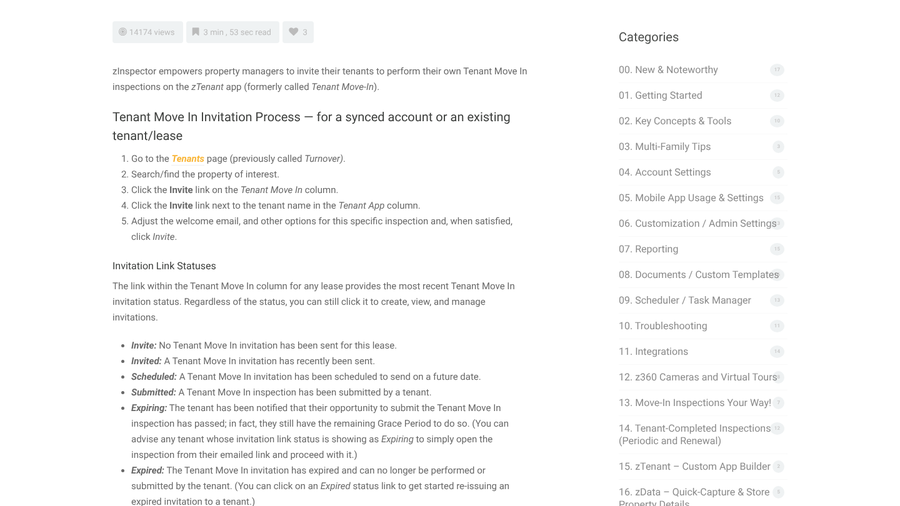
Some property managers now hand the move-in inspection to the tenant. With zInspector, one of the common tools, the manager sends an emailed invitation to its zTenant app, and the tenant completes and submits the inspection on their phone. On shared leases, zInspector lets each roommate inspect their own bedroom and split up the common areas.
The detail that catches people out is the deadline. zInspector’s own help page describes invitation statuses that move from Invited to Expiring, when the tenant is warned their window has passed but a grace period remains, and then to Expired. Once expired, the inspection “can no longer be performed or submitted by the tenant,” although the manager can reissue it.

Apps are useful because they timestamp entries and keep them in one place. They are limited because they follow a template written for the landlord, capture only what fits in each slot and live on a system you do not control.
Move-in inspection checklist: 9 steps the app will not do for you
1. Find the deadline before you unpack
Open the invitation the day you get the keys and note the due date. If the window is too short for a real inspection, ask in writing for more time before it expires, not after.
2. Record your own walkthrough first
Before any furniture comes in, walk every room with your phone recording video, then take still photos. Your camera app stamps each file with a date and time, and an empty unit shows floors and walls that furniture would hide. Keep the original files, since images uploaded into an app or sent through a messaging service may be resized or lose details. If you share photos from an iPhone, the Options menu in the share sheet controls whether location and other photo data go with them.
3. Shoot wide, then close
For each defect, take one wide photo that shows where it is in the room and one close-up with something for scale, such as a coin or tape measure. A close-up of a scratch with no context is easy to dispute.
4. Test what the template never asks about
Run every tap for hot water and flush every toilet. Open and close the windows and try each lock and key. Check the smoke alarms, plug a charger into outlets and run the heating and cooling. Start the dishwasher, washer and oven if you have them. Problems you find now are pre-existing. Problems you find in month three are harder to argue.
5. Check the places room templates skip
Look inside cabinets and closets and under sinks. Check behind appliance doors and at window screens and blinds. Include any balcony, storage unit or parking space. These areas often have no slot in the app, so add them in its notes field and in your own record.
6. Write notes that describe, not rate
“Good” and “fair” mean different things to different people. In September 2026, a Toronto renter on Reddit described signing a building form saying the unit was in good condition, then finding scratches on the stovetop and walls minutes later. Commenters advised putting the problems in writing right away, as well as in photos. Write what and where instead: “two scratches, about 3 inches, left burner area of stovetop.”
7. Email your photos and a summary to the landlord
Send a short email listing every defect, with photos attached or linked, within a day or two of moving in. A California law firm’s guidance on the state’s new photo rules suggests sending a summary of pre-existing conditions within 48 hours. The email creates a dated record outside the app that the landlord cannot say they never saw.
8. Save a copy of the submitted report
After you submit, download the report or screenshot every page. Ask the manager for a copy if the app does not offer one. Access to a tenant app can end with the lease, and you will need the report most after you have moved out.
9. Store everything where you will find it in a year
Put the video, photos, emailed summary and report in one folder named with the address and move-in date, and back it up to cloud storage. Keep it until your deposit is returned and any dispute is settled.
What the law requires in some states
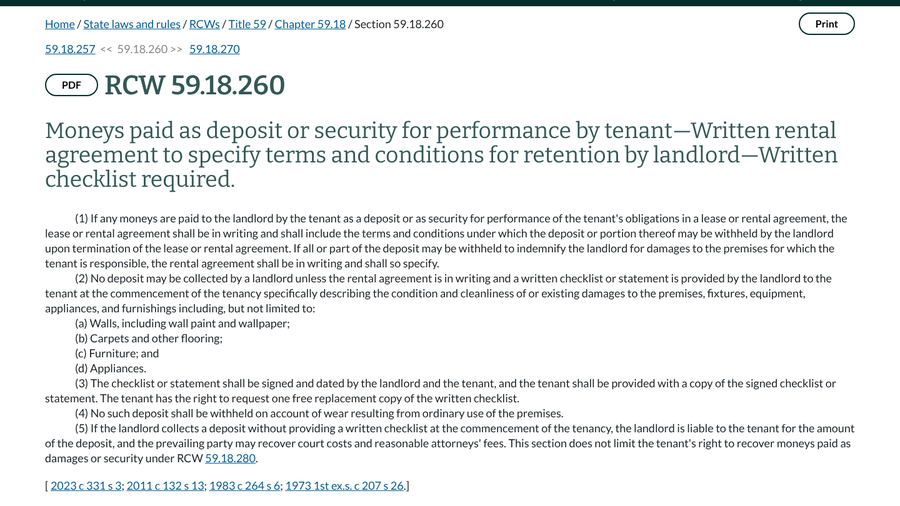
Rules vary by state, and a landlord’s app does not replace them. In Washington, RCW 59.18.260 says a landlord cannot collect a deposit unless they give the tenant a written checklist describing the unit’s condition at the start of the tenancy. The checklist must be signed and dated by both sides, and the tenant gets a copy.
California added photo rules through AB 2801. Since April 1, 2025, landlords must photograph a unit after move-out and after repairs or cleaning before deducting from a deposit. For tenancies starting on or after July 1, 2025, they must also photograph it at move-in. A summary of AB 2801 notes that those photos form part of the documentation landlords must provide with deductions. Tenants should still take their own, since you cannot control when or how the landlord’s photos are taken.
When you move out, the same record helps with the other end of the process. Our guides to move-out cleaning receipts that protect your deposit and building a demand letter packet for a deposit dispute show how to use it.
This article is general information, not legal advice. Deposit and inspection rules vary by state and city, so check your local landlord-tenant law or contact a tenant rights organization for advice on a specific situation.
Key Takeaways
- Complete the landlord’s app inspection before it expires, and ask for more time in writing if you need it.
- Take your own dated video and photos before moving furniture in, and keep the original files.
- Test fixtures and check cabinets, storage and outdoor spaces the app template may skip.
- Email a written defect summary with photos, and save a copy of the submitted report.
Frequently Asked Questions
What should a move-in inspection checklist include?
A move-in inspection checklist should cover each room’s walls, floors, windows and doors. It should also cover appliances, plumbing, locks and smoke alarms, along with storage areas. Record each defect with its location, a wide photo and a close-up.
What happens if I miss the app inspection deadline?
In apps such as zInspector, an expired invitation can no longer be submitted by the tenant, but the manager can reissue it. Ask in writing for a new invitation and send your own photos and defect list by email in the meantime.
Are my own phone photos enough evidence?
Your own phone photos are strong evidence when they are dated, show the location of each defect and were shared with the landlord soon after move-in. Emailing them creates a record the landlord cannot easily dispute.
Should I sign a move-in form that says the unit is in good condition?
Before signing, add any defects you find to the form or attach a list, and keep a copy. If you already signed, send a written list of problems with photos as soon as possible.
How long should I keep move-in inspection photos?
Keep move-in photos and reports until your security deposit has been returned and any dispute over deductions is settled. Many renters keep them for the length of the tenancy plus a year.
Practical Takeaway
Treat the landlord’s app as their record and build your own alongside it. On move-in day, open the invitation and film the empty unit. Test everything, then send a dated email with your photos and a specific list of problems. Then download the submitted report and file it with the rest. Twenty minutes of documentation now is the easiest money you will ever keep at move-out.