

Five parent communication apps teachers can use alongside Google Classroom, what each costs in 2026 and the privacy and texting changes to check before you invite families.
In June 2026, a New York City teacher posted an email from TalkingPoints to Reddit. The free app was ending text messages for individual teacher accounts in October, and the teacher called it “a horrible decision.” They teach a high immigrant population, and most parents didn’t use the app or know how to. That change is now in effect, and Remind has similar limits for accounts outside verified K-12 schools. Add Google Classroom’s bare-bones family features, and a lot of teachers are rethinking how they reach home. This guide compares five parent communication app options and the settings that decide who sees what.
The best parent communication apps to pair with Google Classroom in 2026 are:
- ClassDojo: best for building an elementary class community
- Seesaw: best for sharing student work privately with each family
- Remind: best for quick class updates from a verified school
- TalkingPoints: best for families who speak other languages
- ParentSquare: best for schools that want one district-wide system
Quick Picks
| App | Best For | Cost for Teachers | Watch Out For |
|---|---|---|---|
| ClassDojo | K-5 class community | Free | Parent-to-parent chat teachers can’t switch off |
| Seesaw | Private student portfolios | Free Starter plan for one class | New Starter limits since June 30, 2026 |
| Remind | Quick class texts | Free Remind Chat | SMS only for verified K-12 staff |
| TalkingPoints | Multilingual families | Free | No SMS on free accounts since October 19, 2026 |
| ParentSquare | District-wide messaging | Paid by school or district | Needs your district to adopt it |
Table of Contents
What Google Classroom gives families, and what it doesn’t
Google Classroom’s built-in option for parents is guardian email summaries. A teacher or school administrator invites a guardian, who can then choose daily or weekly emails. Each summary lists missing work, upcoming work and recent class activity such as announcements and assignments. Google says the summaries don’t include grades, and they’re turned off by default. The student also has to use Classroom with a school Google Workspace account.

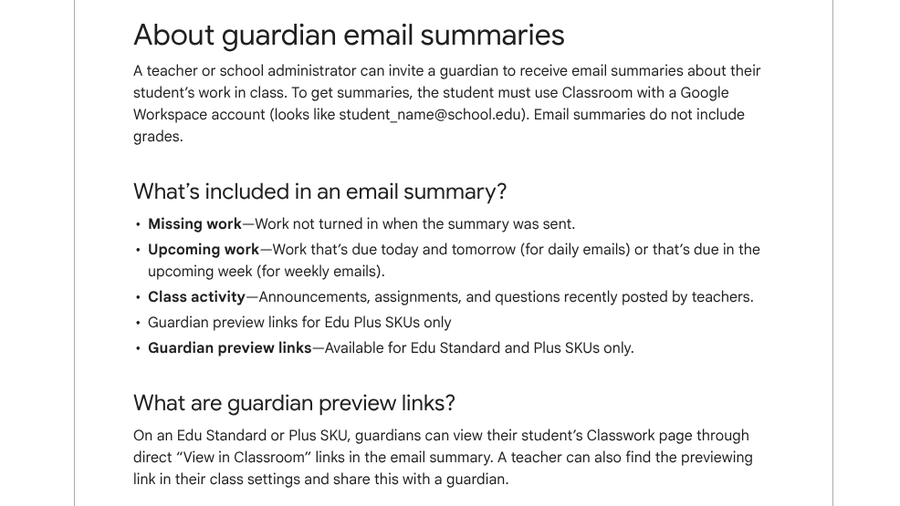
On the privacy side, the design is cautious. When a teacher emails all guardians, Google adds them as BCC recipients, so families don’t see each other’s addresses. Guardians at schools with the paid Education Standard or Plus editions can also open preview links to a student’s Classwork page. What’s missing is conversation. There’s no two-way chat, no photo sharing and no built-in translation, which is why so many teachers add a separate app.
What to check before choosing a parent communication app
- Who sees what. Can families see only their own child’s work, or everything posted to the class?
- Contact privacy. Does the app hide your personal phone number and keep families’ details private from each other?
- Texting rules. Carrier rules changed free texting on some apps in 2026, so check whether families without the app still get messages.
- Translation. Will a parent who reads Spanish, Arabic or Haitian Creole get your message in their language?
- District approval. Ask your school’s tech office whether the app is approved before you invite families. Uploading rosters to an unvetted app can create the same risks we covered in school registration upload mistakes.
1. ClassDojo
Best for: Elementary teachers who want messaging, photos and behavior points in one app.
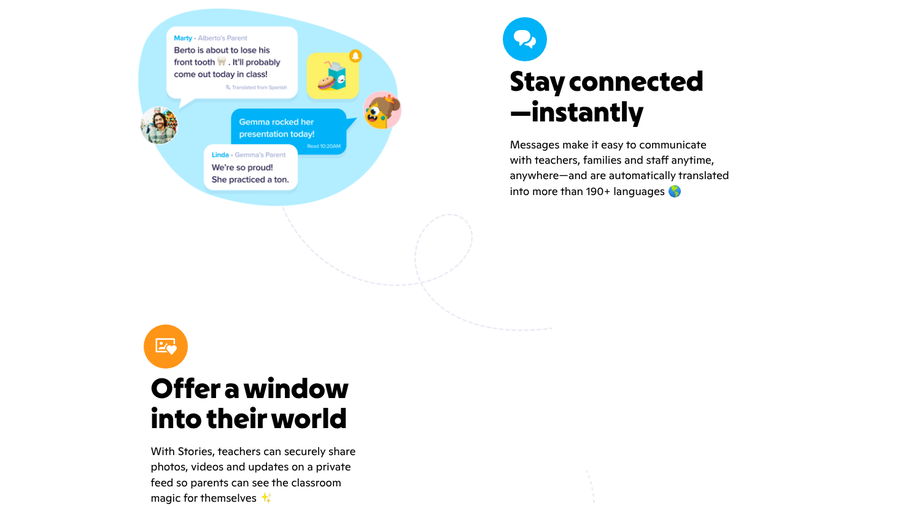
ClassDojo is free for teachers and says it’s used by more than 45 million students and parents. Messages between teachers and families are automatically translated into more than 190 languages. Stories let you share photos, videos and updates on a private class feed, and Events add calendar reminders. Points and Portfolios give families a view of how their child is doing day to day. Before you post class photos to Stories, check what the files reveal. Our guide to photo albums that leak locations explains the metadata to watch.
For elementary classrooms, that mix is hard to beat. Parents get a steady stream of small wins, and teachers can message one family or the whole class from the same place. The translation feature does a lot of work in multilingual classrooms without the teacher lifting a finger.
The privacy question to understand is Parent Chat. ClassDojo’s Parent Chat FAQ describes it as an opt-in feature that lets families privately message other families in their child’s class or school. ClassDojo says it keeps contact details private, uses no school-owned data and is separate from teacher messaging. It also says there’s nothing for teachers or school leaders to turn on or off, because families control their own settings. School leaders do get a separate switch for class chats across the whole school.
Class-wide posts need care too. In April 2026, a second grader’s parent on Reddit asked about a teacher’s mass ClassDojo messages to all parents about classroom behavior. Even without names, whole-class behavior notes reach every family. Keep anything about a specific child in a one-to-one message.
- Pros: Free for teachers, translation into 190-plus languages and a private class feed families enjoy checking.
- Cons: Families can use Parent Chat regardless of teacher preference, and the app suits elementary grades better than high school.
Pricing: Free for teachers. ClassDojo also sells an optional paid tier, ClassDojo Plus.
2. Seesaw
Best for: K-6 teachers who want families to see their own child’s work, not the whole class.
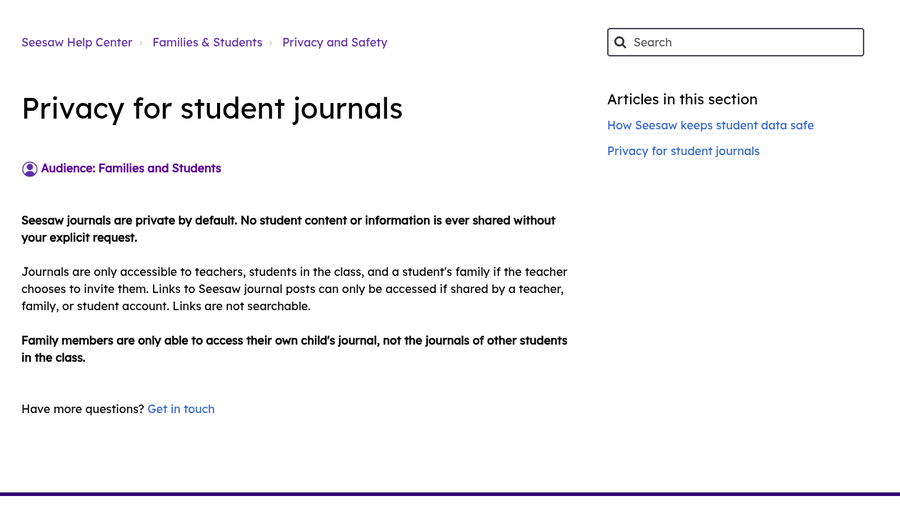
Seesaw is built around student journals, digital portfolios where kids post their work for their teacher and family to see. For privacy-minded teachers, the default visibility is the draw. Seesaw’s privacy help page says journals are private by default. They’re only accessible to teachers, students in the class and a student’s family if the teacher invites them. Family members can see their own child’s journal but not the journals of other students in the class, and links to posts aren’t searchable.
That structure fits the plan behind this list: families get rich updates about their own child without seeing classmates’ work. Seesaw also offers family messaging alongside portfolios, and it describes itself as an elementary platform with more than 25 million users.
The free plan changed this year. According to Seesaw’s page on changes to Seesaw Starter, the free tier moved to new limits on June 30, 2026. It now allows one active class per teacher account, one teacher per class and up to 35 students per class. It also caps saved activities at 35 and allows five multimedia attachments per journal post. Existing classes, student work and family connections weren’t affected. Starter users gained AI credits, Highlights and Post Visibility Settings.
Seesaw sells paid licenses only to schools and districts, not individual teachers. A specialist who teaches several sections, or a teacher who co-teaches, will hit the Starter limits fast and needs a school subscription.
- Pros: Private-by-default journals, family access limited to their own child and a free plan for a single class.
- Cons: Starter covers one class and one teacher, and paid plans require a school or district purchase.
Pricing: Seesaw Starter is free for one class. School and district subscriptions are quoted.
3. Remind
Best for: Middle and high school teachers sending quick reminders to students and parents.
Remind has long been the go-to for “test tomorrow” and “bus leaves at 7” messages. Remind Chat is free for teachers and works for classes, clubs and teams. Remind says it protects contact information and offers downloadable message history. It also translates messages automatically into each recipient’s preferred language. Remind pitches the app as a way to be available to students without feeling like you’re on call, and the paid Remind Hub adds school-wide messaging for schools and small organizations.
Message history matters more than it sounds. In February 2026, a teacher on Reddit said their documentation of parent communication “always starts strong and falls apart by winter,” scattered across emails, calls and hallway conversations. A single app with an exportable history makes the record keeping easier when an administrator asks what was said and when.
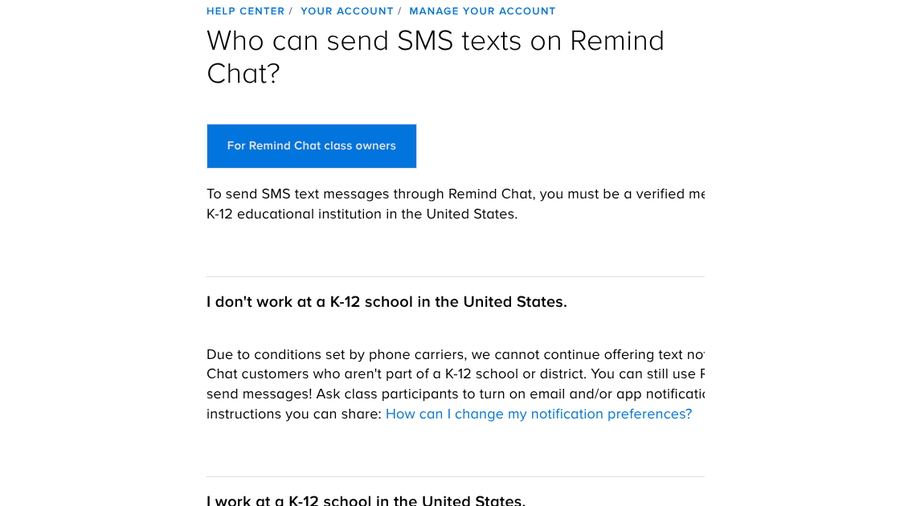
Texting now depends on verification. Remind’s help article on who can send SMS texts on Remind Chat says you must be a verified member of a verified US K-12 institution. Because of conditions set by phone carriers, Remind no longer offers text notifications to Chat customers outside a K-12 school or district. Those users rely on app and email notifications. If you coach a community team or teach at an after-school program, plan for that.
Remind is also part of ParentSquare, which acquired it in December 2023. Remind Chat and Remind Hub remain available, but some districts have moved to ParentSquare for the 2026-27 school year. Check what your district plans before building a class list you’ll have to rebuild.
- Pros: Free, simple two-way messaging with protected contact details and downloadable message history.
- Cons: SMS requires school verification, and districts moving to ParentSquare may phase it out.
Pricing: Remind Chat is free. Remind Hub for schools is priced by quote.
4. TalkingPoints
Best for: Teachers whose families need messages in their home language.
TalkingPoints is a nonprofit family engagement platform built around translation. It supports more than 150 languages and remains free for individual teachers. The teacher app keeps your cell number private because messages go through the app, not your phone. TalkingPoints describes it as two-way messaging translated into 150 languages, so families can write back in their home language.
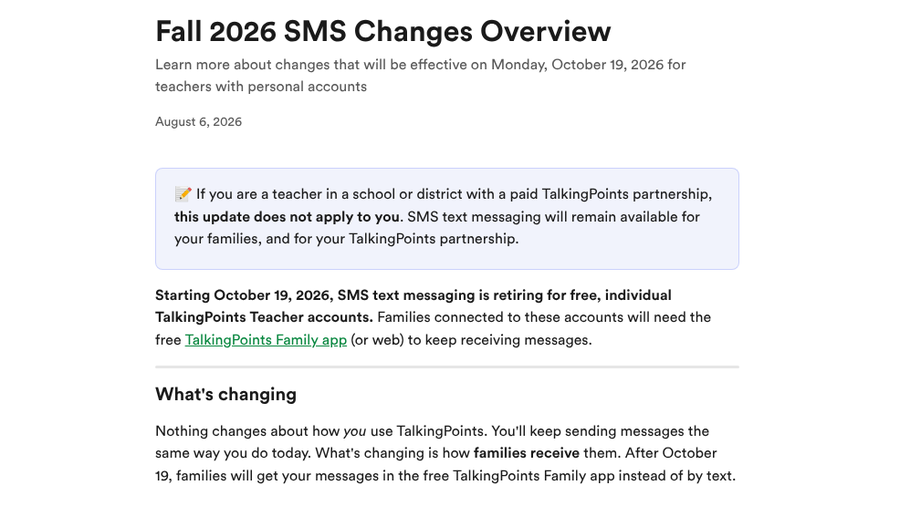
The big 2026 change is texting. TalkingPoints’ Fall 2026 SMS changes overview says SMS messaging retired for free, individual teacher accounts on October 19, 2026. Families connected to those accounts now receive messages through the free TalkingPoints Family app or the web instead of by text. Message history stays intact, and teachers send messages the same way as before. Schools and districts with a paid TalkingPoints partnership keep SMS.
That’s the change the New York City teacher worried about. For families who never downloaded an app, messages stop arriving until they do. The Family app does add features texts couldn’t, including photo and video sharing and a “Help Me Understand” tool that explains school jargon in plain language. It also has text-to-speech and speech-to-text. Send home the QR code flyer TalkingPoints provides and follow up with families who haven’t connected, especially those without reliable data plans.
Two details from TalkingPoints’ FAQ help with that follow-up. Families without a smartphone can use TalkingPoints on the web with no download. And a family can’t opt back into texts on a free teacher account, even if they ask. Texting is only available through a paid school or district partnership, and teachers can request a quote for one.
- Pros: Translation in 150-plus languages, a private teacher number and a free plan from a nonprofit.
- Cons: Free accounts no longer send texts, so families must install the app or use the web.
Pricing: Free for individual teachers. School and district partnerships, which include SMS, are priced by quote.
5. ParentSquare
Best for: Schools and districts that want every teacher and office on one platform.
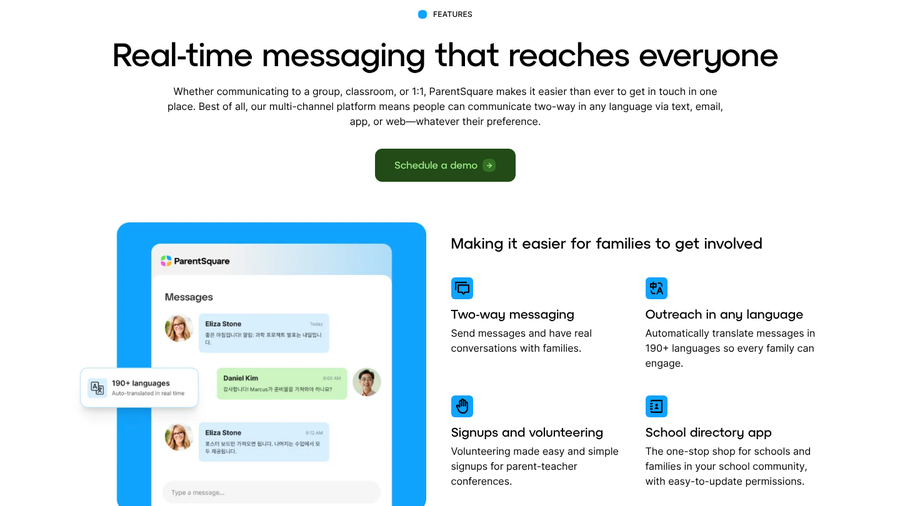
ParentSquare is a district-level platform, but it has a full set of classroom tools for teachers. You can message a group, a class or a single family. Families reply by text, email, app or web in their preferred language. Messages are automatically translated into more than 190 languages.
Beyond messaging, teachers can run volunteer signups, schedule parent-teacher conferences and collect permission slips and payments. ParentSquare also offers a school directory app with permission controls, which lets schools decide what contact information families can see. A separate StudentSquare app gives students their own messaging space with safeguards and parent visibility.
The privacy advantage is centralization. When a district adopts ParentSquare, it controls one system and its directory permissions. Teachers aren’t signing families up for a patchwork of free apps, each with its own data practices. That’s also why some districts are replacing Remind with ParentSquare for the 2026-27 school year.
The limitation is that you can’t adopt it alone. ParentSquare sells to schools and districts, so an individual teacher needs administrators on board before any family gets an invite. If your district already pays for it, use it instead of adding another app, since families prefer one place for everything.
Notifications decide whether any platform works. In September 2026, a parent on Reddit said they constantly missed messages from their school’s app because updates landed in a hidden section and notifications never arrived. Whatever your school uses, walk families through turning on notifications at back-to-school night or the first conference.
- Pros: One platform for classroom and district messages, translation in 190-plus languages and district control over directories and data.
- Cons: Individual teachers can’t sign up on their own, and pricing isn’t public.
Pricing: Paid by schools and districts, with quotes on request.
How We Chose These
We focused on parent communication apps a K-12 teacher can use alongside or instead of Google Classroom’s family features. We compared what families can see, how contact details are protected and whether messages reach families by text, app or email. We also looked at translation coverage and what each option costs an individual teacher versus a school. We checked each app’s current help articles and policy pages for 2026 changes, including new free-plan limits and texting rules. We read teacher and parent discussions to understand the practical trade-offs.
The Bottom Line
If your district already pays for ParentSquare or another platform, use it. For elementary teachers choosing on their own, ClassDojo is the easiest free option for a class community, and Seesaw is the pick if you want families to see only their own child’s work. Remind still suits quick updates from a verified school. TalkingPoints is the best choice for multilingual families, as long as you help them install the app now that free texting has ended. Whichever you choose, confirm it’s approved by your school before inviting families.
Frequently Asked Questions
What is the best parent communication app?
The best parent communication app depends on your school. ClassDojo is best for elementary class communities, Seesaw for private student portfolios and TalkingPoints for multilingual families. If your district already uses ParentSquare, that’s the best choice.
Can parents see grades in Google Classroom?
No. Google says guardian email summaries don’t include grades. They list missing work, upcoming work and class activity, and guardians must be invited by a teacher or school administrator.
Is ClassDojo free for teachers?
Yes. ClassDojo says it is free for teachers, forever. It also sells an optional paid tier called ClassDojo Plus.
Why did my free teacher app stop sending text messages?
Texting on free accounts changed in 2026. TalkingPoints ended SMS for free individual teacher accounts on October 19, 2026. Remind limits SMS to verified K-12 school members because of phone carrier conditions.
Can parents see other students’ information in these apps?
It depends on the app and the post. Seesaw limits families to their own child’s journal. Class-wide posts on ClassDojo or other apps are visible to every family in the class, so keep anything about one student in a private message.