

Why a simple travel itinerary spreadsheet beats the airline app when schedules keep moving, which columns and formulas to use, and what to do when a change crosses the refund line.
You booked an 8:15 a.m. flight months ago. Then the emails start: 7:30, then 7:05, then 7:00, then 6:15. Each one looks minor, and each one quietly replaces the last in the airline’s app. In January 2026, a traveler on Reddit described exactly this string of changes and was told that because each change was small, nothing was owed. By then, nobody had the original times in front of them. A travel itinerary spreadsheet fixes that problem, because it keeps the first version of your trip next to every version that follows.
The Short Version
An itinerary spreadsheet helps when airlines change schedules repeatedly, because it records the original times, every change and the date you were told. That shows cumulative shifts, broken connections and whether a change meets the U.S. Department of Transportation’s refund threshold: 3 hours for domestic flights and 6 hours for international flights, measured against the original schedule.
Table of Contents
Why the airline app is not enough
Airline apps and confirmation pages show your trip as it stands today. They rarely show what you originally bought or how it changed along the way. That matters in two situations.
The first is connections. In January 2026, a United passenger on Reddit found that a schedule change had turned a comfortable 3-hour connection in Houston into 22 minutes before an international flight. In August, an American Airlines passenger saw a first leg pushed an hour later, cutting a connection to Zurich from 2 hours to 1 hour 10 minutes. Neither traveler did anything wrong. The change arrived in an email, and the app simply showed the new times.
The second is refunds. The Department of Transportation’s own Fly Rights guide tells passengers to re-check departure and arrival times a few days before a trip, because schedules sometimes change. A spreadsheet turns that advice into a record you can use.
The travel itinerary spreadsheet columns that matter
You can build this in Google Sheets, Excel or Numbers. Use one row per flight segment and keep a separate tab for the change log.
| Column | What to enter | Why it matters |
|---|---|---|
| Segment and flight number | Route and carrier flight number | Spots swapped flights and new connection points |
| Confirmation and ticket number | Record locator and 13-digit ticket number | Speeds up calls and refund requests |
| Original departure and arrival | Local times from your first confirmation | The baseline for every refund question |
| Current departure and arrival | Local times from the latest email or app | What you are actually flying |
| Shift in hours | Formula: current minus original | Shows cumulative change, not just the latest step |
| Connection time | Formula: next departure minus this arrival | Flags connections that have become too tight |
| Domestic or international | D or I | Sets the 3-hour or 6-hour threshold |
On the change log tab, add a row every time the airline emails you, with the date received, the segment, and the old and new times. Note what you did about it, including any agent name or case number. Paste in the subject line of the airline’s email so you can search for it later.
Formulas that flag problems automatically
Three simple checks do most of the work:
- Shift in hours. Subtract the original departure time from the current one for the same airport and multiply by 24. Because both times are at the same airport, time zones do not get in the way.
- Refund flag. Add conditional formatting that turns the cell red when the absolute shift reaches 3 hours for a domestic segment or 6 hours for an international one.
- Connection check. Subtract the arrival time from the next departure at the same connecting airport. Color it orange below your personal minimum, such as 60 minutes for domestic and 2 hours for international.
The minimums are your call, not an airline rule. One experienced commenter in the United thread advised infrequent flyers to aim for 2 hours or more. Enter the full date with each time, or overnight connections will calculate as negative numbers.
What the U.S. refund rule counts as a significant change
Since the Department of Transportation’s automatic refund rule took effect in October 2024, airlines covered by it must refund your ticket if they significantly change your flight and you choose not to travel or accept the alternatives offered. The department’s refunds page defines an early departure as leaving 3 or more hours earlier than the original scheduled time for domestic trips, or 6 or more hours for international ones. A late arrival uses the same thresholds.

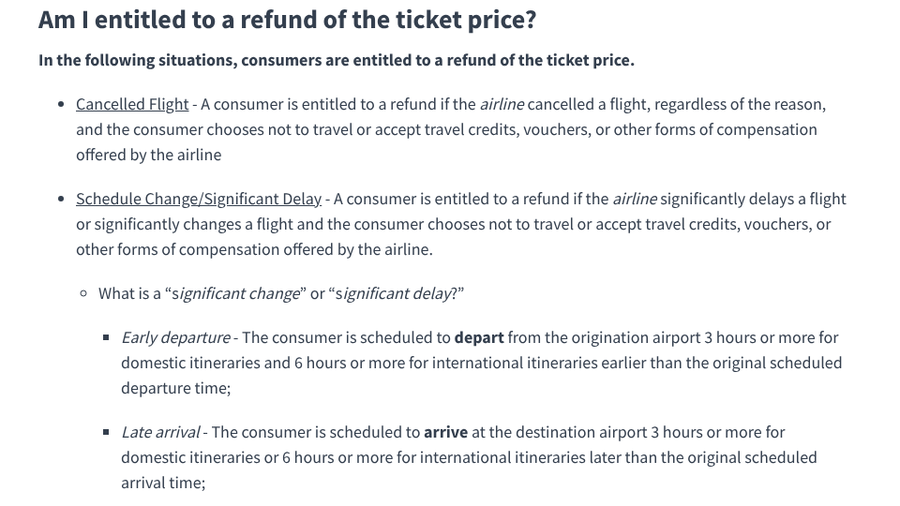
The comparison is with the original scheduled time, which is why the spreadsheet’s baseline column matters. Five small moves can add up to a change that qualifies. The department’s explainer lists other significant changes too.
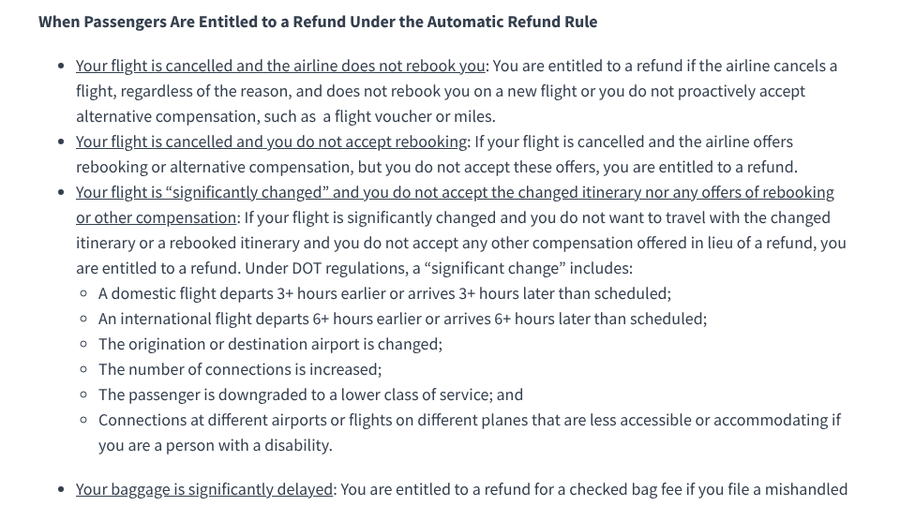
These include a new origin or destination airport, more connections, a downgrade to a lower class, and connections that are less accessible for a passenger with a disability. Rules differ outside the U.S., so check the regulations that apply to your airline and route. The January easyJet case above involved a flight from the UK, where different passenger rules apply.
What to do when your spreadsheet flags a change
- Check every segment on the itinerary. A change to the first leg can break a connection on the second.
- Look for alternatives before you call. Commenters in the United thread advised having preferred routings ready, since agents have more flexibility after an involuntary change.
- Try the app first. The app may let you pick a different flight at no charge after a schedule change, as commenters noted for United.
- Decide between rebooking and a refund. If the change meets the significant-change threshold and none of the alternatives work, ask for the refund.
- Log what happened. Add the outcome, the agent’s name and any case number to your change log.
If you would rather not maintain a spreadsheet by hand, our list of TripIt alternatives without inbox access covers apps that import forwarded confirmations and send flight alerts. Keep the original-times column even then, because apps often overwrite old times. A later arrival can also collide with a check-in window, which is where rentals from our list of Airbnb alternatives with self check-in help.
At a Glance
- Airline apps show your current flight, not the original, so repeated small changes are easy to miss.
- Keep original and current times side by side and let formulas calculate the shift and connection times.
- U.S. refunds apply when a flight departs earlier or arrives later by 3 hours domestic or 6 hours international, compared with the original schedule.
- Log every change email with the date, old time, new time and what you did.
Frequently Asked Questions
What should a travel itinerary spreadsheet include?
A travel itinerary spreadsheet should include each flight segment with its confirmation and ticket numbers. Add original and current departure and arrival times, the shift in hours and connection times, plus a separate log of every change notice you receive.
Do small airline schedule changes add up for a refund?
Under U.S. Department of Transportation rules, early departures and late arrivals are measured against the original scheduled time. Several small changes that together reach 3 hours on a domestic flight or 6 hours on an international flight can qualify.
Is Google Sheets good for a travel itinerary?
Google Sheets works well for a travel itinerary because it is free, easy to share with travel companions, and keeps a version history of edits. You can also make a file available offline before you fly.
What should I do if a schedule change makes my connection too short?
Contact the airline or use its app to choose a different flight, since involuntary schedule changes usually allow a free rebooking. Have a few alternative flights in mind before you call.
How far ahead do airlines change flight schedules?
Airlines can change schedules months before departure, which is why travelers who book early often see several changes. Check your itinerary periodically and again a few days before you fly.
What To Do Next
Open a new spreadsheet today and copy in your upcoming flights exactly as they appear on your original confirmations. Add the shift and connection formulas, set the red and orange flags, and create the change log tab. From now on, every time an airline emails you, spend two minutes updating the sheet. When a change finally crosses the line, you will have the proof ready instead of trying to reconstruct it from an inbox full of emails.