
Using a travel router on hotel Wi-Fi: how it works, eight ways to get it past a login page that will not load, and the setups that skip the router entirely.
You check in, plug in the travel router you bought for exactly this trip, and connect your phone. Nothing loads. The hotel’s sign-in page that popped up instantly on your phone last time now spins forever, and the kids want the TV streaming. It is a common first-night problem. In June 2026, a UniFi Travel Router owner on Reddit said an airport portal only worked after they connected their phone directly, copied the portal address and pasted it in again through the router. The good news is that most login-page failures come down to a handful of settings.
Quick Answer
Connect the travel router to the hotel network in repeater (sometimes called WISP) mode, join the router’s Wi-Fi with your phone and open a browser to trigger the hotel login page. If it will not load, turn on the router’s public hotspot login mode, pause any VPN or ad blocker, and clone your phone’s MAC address. If none of that works, try the room’s Ethernet port or share Wi-Fi from a laptop.
Table of Contents
How a travel router handles hotel Wi-Fi
A travel router joins the hotel network as one device, then creates its own private Wi-Fi network for everything you brought. GL.iNet’s guide to captive portals explains the appeal: some hotel networks limit guests to two devices, and the hotel “will only recognize the travel router as a single device.” Once your devices remember the router’s network, they reconnect on their own at every hotel.
The catch is the login page, known as a captive portal. The hotel needs someone to accept its terms or enter a room number before it lets traffic through. The router has no screen, so it passes that page to the first phone or laptop that opens a browser on its network. As one commenter in a June 2026 r/HomeNetworking thread put it, the first device you connect will see the portal, and once you click through, all your devices should work.
8 ways to get a travel router past the hotel login page
1. Open the login page from a device on the router’s Wi-Fi
Set the router to repeater mode and select the hotel network. Then connect your phone or laptop to the router’s Wi-Fi, not the hotel’s, and open a browser. If the page does not appear on its own, go to a plain web address. One commenter in the UniFi thread suggested captive.apple.com, the address Apple devices use to check for a login page. If your phone still does not show it, GL.iNet recommends turning the phone’s Wi-Fi off and on and reconnecting to the router.
2. Turn on the router’s public hotspot login mode
Newer routers include tools built for this problem. On GL.iNet models running firmware 4.6 or later, the Join Network screen has two switches: Auto-Enable Login Mode for Public Hotspots, which pauses some services until you get online, and Camouflage, which makes the router borrow the MAC address of the device you use to reach its admin panel.

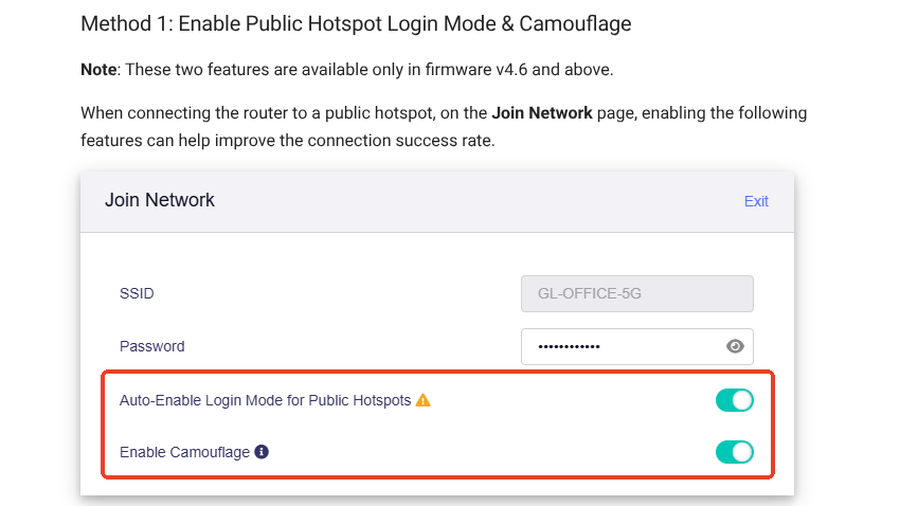
GL.iNet notes that login mode switches DNS to automatic, which may expose some of your browsing to the hotel network while it is active. Turn your VPN back on once you are connected.
3. Pause the VPN and ad blocker until you are in
The features that make a travel router useful can also block the portal. GL.iNet’s troubleshooting steps are to turn off DNS rebinding protection, set DNS mode to automatic, disable any VPN client and switch off AdGuard Home. Then refresh the login page. Once the hotel lets you through, turn protection back on one feature at a time.
4. Clone your phone’s MAC address
Some hotels register each device by its MAC address, a hardware ID, and cap how many you can add. GL.iNet’s fix is to log in on your phone first, note the Wi-Fi address it used for the hotel network, then copy that address into the router. The hotel sees the device it already approved.
On an iPhone, you will find that address under Settings, Wi-Fi, then the hotel network. Apple’s private Wi-Fi address settings offer Off, Fixed and Rotating on iOS 18 and later. Setting the hotel network to Fixed keeps the address from changing after you clone it.
5. Change the router’s address if it clashes with the hotel
Two networks using the same address range can confuse the router. In a May 2026 r/marriott thread, a GL.iNet Beryl owner who had used it for hundreds of hotel nights said the router’s factory address, 192.168.8.1, is sometimes also used by Marriott for streaming devices behind the TVs. Changing the router’s LAN address to a different range fixes that kind of conflict, and GL.iNet has a help page on resolving subnet conflicts.
6. Try the room’s Ethernet port
Where a working wall port exists, a cable can be much faster than hotel Wi-Fi. A March 2026 poster on r/HomeNetworking showed far higher speeds hardwired than over the wireless portal. Do not count on it, though. A commenter who used to run hospitality networks said wired ports usually carry the same restrictions as Wi-Fi, and that ports feeding TVs often sit on a separate network that only accepts approved devices. Use a free wall jack rather than unplugging the TV or phone.
7. Skip the router and share Wi-Fi from a laptop
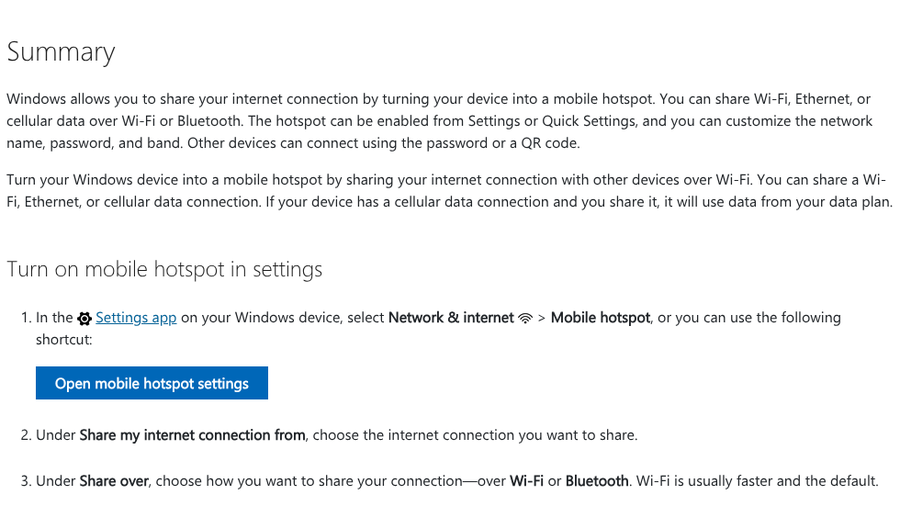
A Windows laptop can act as a travel router in a pinch. Microsoft’s mobile hotspot guide says you can share a Wi-Fi, Ethernet or cellular data connection with other devices. Log in to the hotel portal on the laptop, then share that connection to a console or streaming stick.
An iPhone cannot do the same with hotel Wi-Fi. Apple says Personal Hotspot uses the phone’s cellular data connection, so it shares your data plan instead. Some Android phones can share a Wi-Fi connection, depending on the model.
8. Call the hotel’s Wi-Fi support line
Devices without browsers, such as game consoles and e-readers, are the hardest to get online. In August 2026, a Nintendo Switch owner on Reddit said a Marriott login page would not load on the console, then got it connected by calling the hotel’s Wi-Fi provider with the device’s IP and MAC addresses. The number is usually on the Wi-Fi card at check-in or on the login page itself. GL.iNet’s own last-resort advice is the same: ask the hotel for help.
When a travel router is not worth the hassle
A router adds a step, and it does not always add speed. Commenters in the June r/HomeNetworking thread pointed out that if a hotel limits bandwidth per device, everything behind your router shares one device’s allowance. Some networks also log you out after a period of inactivity, which means repeating the login on the router. For a single night with two devices, signing each one in directly can be quicker. A router pays off on longer stays, with a family’s worth of devices, or when you need a console or streaming stick online.
If your phone keeps dropping Wi-Fi at the hotel, our guide to iPhone Wi-Fi drops after iOS updates covers the phone-side fixes. And to keep the rest of the trip organized, see our list of TripIt alternatives that don’t need your inbox.
At a Glance
- A travel router logs into hotel Wi-Fi once, then shares that connection with all your devices as one.
- Open the login page from a phone connected to the router, and use captive.apple.com if it does not pop up.
- If the page fails, turn on hotspot login mode, pause VPN and ad blocking, and clone your phone’s MAC address.
- Ethernet ports, a Windows laptop hotspot or a call to hotel Wi-Fi support can cover what the router cannot.
Frequently Asked Questions
Do travel routers work with hotel Wi-Fi?
Travel routers work with most hotel Wi-Fi. You connect the router to the hotel network, complete the login page from a phone or laptop on the router’s Wi-Fi, and the hotel then treats the router as one device.
Why won’t the hotel login page load through my travel router?
The login page often fails when a VPN, DNS protection or ad blocker is active on the router, or when the hotel only approves registered devices. Pause those features, try the router’s hotspot login mode and clone your phone’s MAC address.
Does a travel router slow down hotel Wi-Fi?
A travel router adds little delay on its own, but if the hotel limits bandwidth per device, all your devices share one device’s allowance. Where a working Ethernet port is available, a wired connection is often faster.
Can my iPhone share hotel Wi-Fi as a hotspot?
An iPhone cannot share hotel Wi-Fi, because Personal Hotspot uses its cellular data connection. A Windows laptop can share a Wi-Fi connection through Mobile hotspot, and some Android phones can too.
How do I connect a game console to hotel Wi-Fi with a login page?
Connect the console to a travel router or a laptop hotspot that has already passed the login page. If that is not possible, call the hotel’s Wi-Fi support line with the console’s MAC address and ask them to approve it.
Practical Takeaway
Set the router up at home before you leave: update the firmware, change its LAN address away from 192.168.8.1, and learn where the login mode and MAC clone settings live. At the hotel, connect the router first, sign in from your phone, then add everything else. Keep the Wi-Fi support number handy for the device that refuses to cooperate.