
The documents districts usually ask for at kindergarten and new student registration, the upload mistakes that get them sent back, and what to do when a paper is missing.
Registration opens on a Monday morning. You photograph the lease, the birth certificate and a utility bill at the kitchen table, upload them between work calls and hit submit. Two days later, an email says a document “could not be verified.” There is no detail, the deadline is Friday, and the office line goes to voicemail. Most online kindergarten registration problems are not about missing paperwork. They come from the file, the date or the name on it, and nearly all of them can be fixed before you submit.
Quick Answer
Kindergarten and new student registration usually requires proof of age, two recent proofs of residency, immunization records and a parent photo ID. Uploads get rejected most often because files are too large, pages are split into separate files, proofs of address are too old or the wrong type, or names do not match. Scan each document to a single PDF and check your district’s accepted-documents list first.
Table of Contents
What kindergarten registration usually asks for
Every district sets its own list, but the core documents look similar across the country. Riverside Unified’s online enrollment requirements in California are a typical example: birth verification, two proofs of address dated within 30 days, an immunization record, a parent or guardian’s government photo ID and a health history form. Parents upload each one and then bring the originals to school for verification.
Other districts follow the same pattern. In March 2026, a Huntsville, Alabama parent on Reddit listed what they needed: a mortgage statement or other proof of residence, the child’s birth certificate and immunization record, parents’ IDs and a utility bill. Commenters also noted that new student registration for the 2026-27 year had not opened yet while the state worked through PowerSchool issues, so timing can vary too.
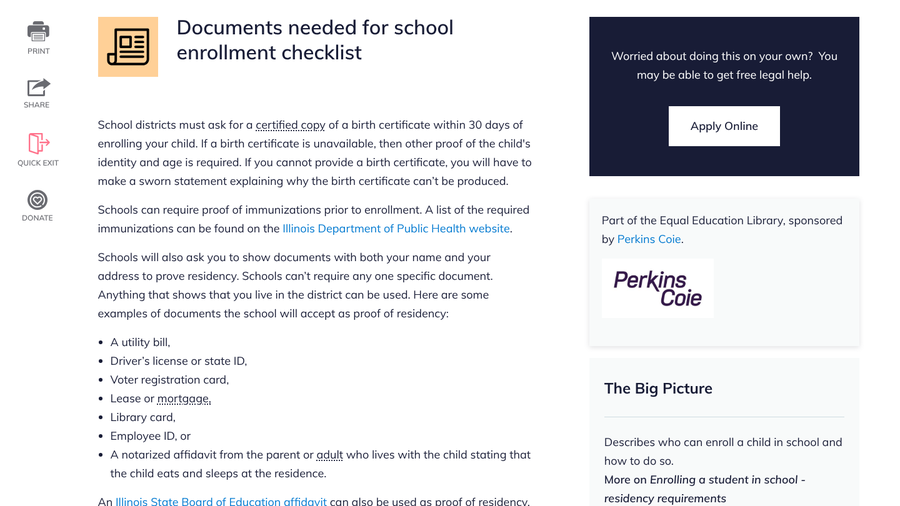
State rules can give you more flexibility than a district form suggests. Illinois Legal Aid Online explains that Illinois districts must ask for a certified birth certificate within 30 days of enrollment, and that families without one can provide other proof of age with a sworn statement. It also says schools cannot require any one specific proof of residency document.
9 upload mistakes that delay kindergarten registration
1. Files that are too large
Enrollment portals often cap file size. One school district’s PowerSchool upload instructions tell parents that files must be under 2.5 MB. A full-resolution phone photo can easily pass that. Use a scanning app such as Google Drive’s scanner or Genius Scan, both of which that guide recommends, to save a smaller PDF.
2. Splitting one document into several files
The same instructions say each upload section accepts only one file, so a three-page lease has to be combined into a single PDF first. Uploading only page one can leave the office without the signature page it needs.
3. A file type the portal will not open
That district prefers PDF and lists JPG, TIF and Word files as acceptable. iPhone photos are often saved as HEIC by default, which some portals will not accept. Scan to PDF instead, or change the camera format to Most Compatible before you shoot.
4. A proof of address that is too old
Many districts want recent proof. Riverside Unified requires residency documents dated within the previous 30 days. A bill from last spring will not count in the fall, even if nothing has changed.
5. The wrong kind of proof
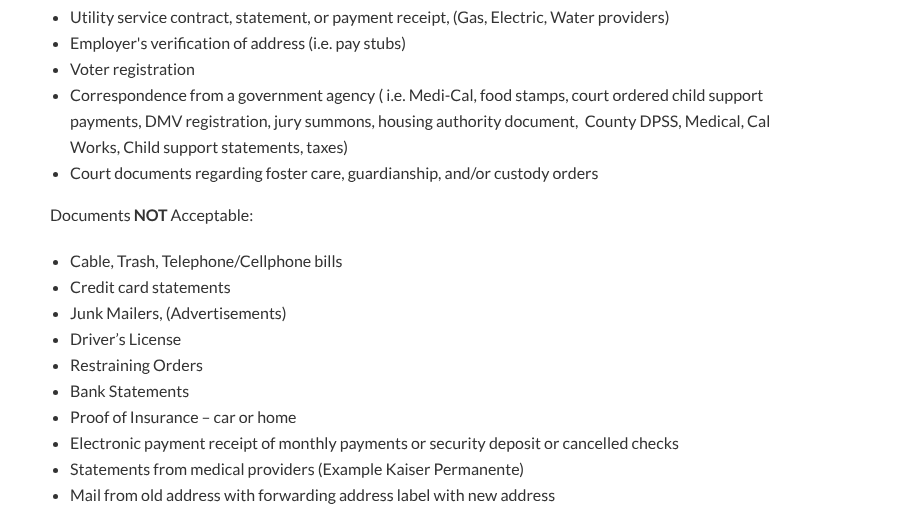
Accepted documents vary more than parents expect. Riverside will not accept cable, trash or cellphone bills, bank or credit card statements, a driver’s license or medical bills as proof of residency. Illinois, by contrast, lists a driver’s license among acceptable examples. Read your own district’s list before you pick which two documents to upload.
6. Names or addresses that do not match
Riverside’s documents must show the parent or guardian’s name and current address. If the lease is in a partner’s name or you live with relatives, ask about a residency affidavit. Illinois accepts a notarized affidavit from an adult who lives with the child, and our guide to name change document rejections covers mismatches after marriage or divorce.

7. Cropped, blurry or glare-covered photos
Staff need to read the issuer, name, address and date. Photograph the full page flat on a dark surface in daylight, with all four corners visible and no flash glare across the text.
8. Missing custody or guardianship papers
If parents are separated or someone other than a parent is enrolling the child, districts often ask for court documents. In April 2026, a separated parent on Reddit described trying to sort out kindergarten paperwork when the child’s mother wanted to use grandparents’ address. Commenters pointed out that joint decision-making orders can matter for which school a child attends.
9. Immunization records in the wrong format
Schools can require proof of immunizations before enrollment, and some ask for a specific state form instead of a printout from a patient portal. Ask the school which version it accepts before your child’s checkup, so the pediatrician’s office can fill in the right one.
If you are missing a document or a deadline
Do not wait until everything is perfect. Contact the school, explain what is missing and ask what it accepts in the meantime. Some states build in time for items like a certified birth certificate, as Illinois does with its 30-day window.
Families experiencing homelessness have extra protection. Under the federal McKinney-Vento Act, the school must immediately enroll a homeless child even if the family cannot produce records normally required, including immunization records and proof of residency, or has missed enrollment deadlines. Ask for the district’s homeless liaison by name.
Missed a charter or choice school deadline? A May 2026 Reddit thread from a parent in that spot drew advice to register with the zoned public school and stay on the waitlist, since spots often open before the school year starts. For general tips on keeping address proofs ready, see our list of proof of residence documents that pass online checks.
Main Takeaways
- Most districts ask for proof of age, two recent proofs of address, immunization records and a parent ID.
- Scan each document into one PDF under the portal’s size limit before uploading.
- Check your district’s accepted and not-accepted lists, since they differ widely.
- Homeless families must be enrolled immediately under federal law, even without the usual records.
Frequently Asked Questions
What documents do I need for kindergarten registration?
Kindergarten registration usually requires your child’s birth certificate or other proof of age, two current proofs of residency, immunization records and a parent or guardian’s photo ID. Some districts also ask for a health history form or custody papers.
Why was my school registration document rejected?
The most common reasons are an oversized or unsupported file, a document split across several uploads, proof of address that is too old or not on the accepted list, and names or addresses that do not match the registration form.
Can I use a phone photo for online school registration?
Most portals accept phone photos if they are clear and within the size limit. A scanning app that saves a single PDF usually works better, because it shrinks the file and keeps multi-page documents together.
What if I do not have a birth certificate for my child?
Many states accept other proof of age when a birth certificate is unavailable, sometimes with a sworn statement. Illinois, for example, requires districts to request a certified birth certificate within 30 days but accepts alternatives when one is unavailable.
Can a school refuse to enroll my child without proof of residency?
Schools can require proof of residency in most cases, but children experiencing homelessness must be enrolled immediately under the McKinney-Vento Act, even without the usual documents. Other families should ask about residency affidavits.
Closing Thoughts
Before registration opens, gather your documents, check the district’s accepted list and turn each one into a single, clear PDF under the size limit. Pull fresh proofs of address within the district’s date window, and keep the originals together for the in-person check. Fifteen minutes of preparation is usually the difference between a same-week confirmation and a round of emails.
Related Posts