
Will your lockdown browser run on a Chromebook? Which testing and proctoring apps support ChromeOS, the Windows settings that quietly block them, and a checklist to use before buying a laptop for school.
A $299 Chromebook looks like the sensible student laptop until the first quiz. The syllabus says “Respondus LockDown Browser required,” the download page offers Windows and Mac installers, and the exam opens in two days. The reverse happens too: a new Windows laptop arrives in S mode and refuses to install the testing app at all. Lockdown browser support on a Chromebook is better than it used to be, but it depends on the app, the course and sometimes a single checkbox in the instructor’s settings.
Short Answer
A Windows laptop that is not in S mode, or a Mac, runs every major lockdown and proctoring app. A Chromebook works with Respondus LockDown Browser when the instructor enables Chromebook support, and it is listed as supported by Honorlock and Proctorio. It will not run ExamSoft’s Examplify, and a personal Chromebook cannot run College Board’s Bluebook for the SAT or AP exams. Check your courses before you buy.
Table of Contents
Lockdown browser on a Chromebook: what each testing app supports
| Testing app | Chromebook | Windows | Mac | Watch for |
|---|---|---|---|---|
| Respondus LockDown Browser | Yes, via extension | Windows 10 and 11, including Arm | macOS 12+ | Instructor must allow Chromebooks; no S mode |
| Honorlock | Yes, ChromeOS listed | Windows 10+ | macOS 13+ | Needs Google Chrome 120 or newer |
| Proctorio | Yes, ChromeOS listed | Windows 10+ | macOS 13+ | Runs in Chrome, Edge, Brave or Opera |
| ExamSoft Examplify | No | Yes | Yes | Also runs on iPad |
| College Board Bluebook | School-managed only | Windows 11 24H2+ | Yes | Personal Chromebooks are not allowed |
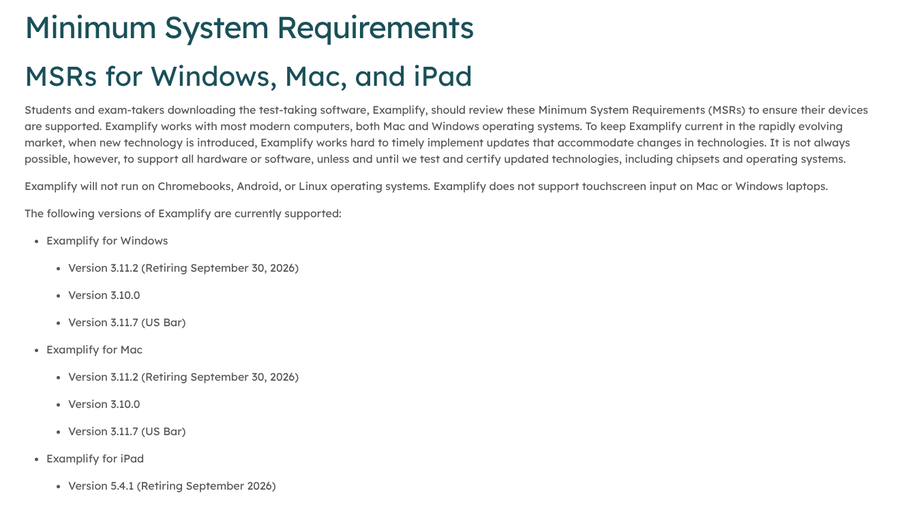
Two of these rules surprise families the most. ExamSoft’s Examplify requirements state plainly that it “will not run on Chromebooks, Android, or Linux operating systems,” which matters for programs such as law schools that use it for exams. College Board’s Bluebook device requirements support Windows, Mac, iPad and school-managed Chromebooks only.

On the proctoring side, Honorlock’s support page lists Windows 10 or newer, macOS 13 or newer and Chrome OS, with Google Chrome 120 or newer. Proctorio’s requirements page lists ChromeOS alongside Windows and macOS.
The Chromebook catch: your instructor has to allow it
Respondus offers LockDown Browser for Chromebook as a browser extension, and Respondus says it also works with Respondus Monitor, its webcam proctoring tool, except in Schoology. The catch is that Chromebook use is switched on exam by exam. College help pages explain that instructors must open the exam’s Advanced Settings and check “Allow students to use LockDown Browser for Chromebook.” If that box is not checked, the extension will not open the exam, however new the Chromebook is.
Course rules can also be stricter than the app makers’ own requirements. One 2025 college algebra syllabus told students that Chromebooks would not work with Honorlock, even though Honorlock lists ChromeOS as supported. Instructors may require features or a second camera setup that they only support on Windows or Mac. As one commenter in an April 2026 MacBook buying thread put it, compatibility comes down to the exact software your courses use.
Keep ChromeOS updated as well. Respondus says LockDown Browser for Chromebook needs at least the version Google offers on its long-term support channel and recommends staying on the latest stable version.
The Windows catch: S mode, SE and older builds
Windows is the safest choice overall, with one trap. Respondus’s requirements page says Windows 10 and 11 in “S mode” are not compatible, that support for S mode is not on its roadmap, and that Windows SE is not compatible either. Many budget laptops ship in S mode, which only allows apps from the Microsoft Store.
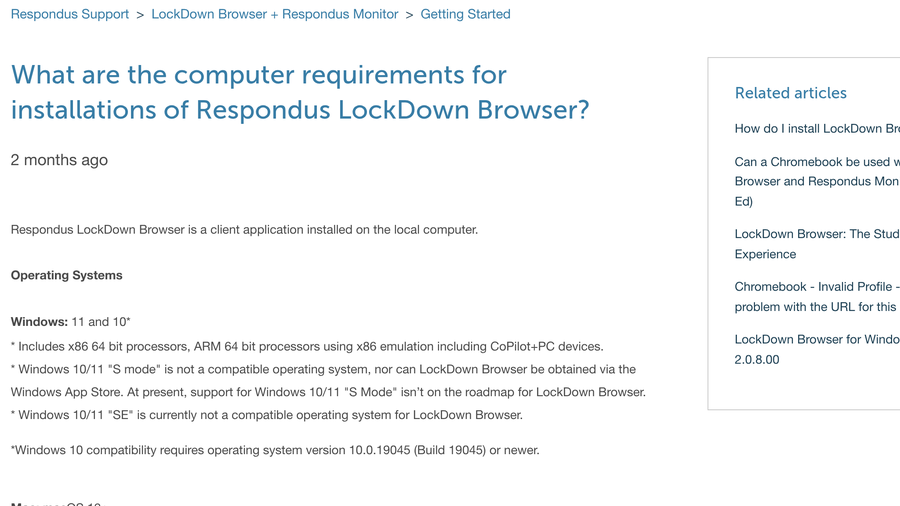
The same page brings good news for newer machines: Respondus supports Arm-based Windows laptops, including Copilot+ PCs, through x86 emulation. Windows 10 needs build 19045 or newer. For SAT and AP testing, Bluebook’s approved-devices page sets a minimum of Windows 11 version 24H2. You can check your edition and version under Settings, System, About.
A checklist before you buy a laptop for school
- Ask for the list of testing apps. Email the program or check course pages for Respondus, Honorlock, Proctorio, Examplify or others.
- Check each app’s requirements page. Match the operating system, version and browser for every app on the list.
- Avoid S mode or plan to leave it. If a Windows laptop ships in S mode, switch out of it before exam week.
- Confirm a working webcam and microphone. Proctored exams require both, and Respondus recommends at least 4 GB of available memory when the webcam is in use.
- Think about standardized tests. A personal Chromebook will not run Bluebook, so plan another device for the SAT or AP exams.
- Run a practice exam early. Most schools offer a practice quiz so you can test the setup before it counts.
Once you have the right device, the room matters too. Our guides to a failing proctoring environment scan and proctoring app permissions worth questioning cover what happens after the testing app installs.
Main Takeaways
- Windows laptops outside S mode and Macs run every major lockdown and proctoring app.
- Chromebooks work with Respondus, Honorlock and Proctorio, but Respondus needs the instructor to allow Chromebooks per exam.
- Examplify does not run on Chromebooks, and personal Chromebooks cannot run Bluebook.
- Ask for your courses’ testing apps and check each requirements page before you buy.
Frequently Asked Questions
Does LockDown Browser work on a Chromebook?
LockDown Browser works on a Chromebook through a Respondus extension, but only for exams where the instructor has enabled Chromebook use. It also needs a supported learning platform and an up-to-date version of ChromeOS.
Is a Chromebook or Windows laptop better for college exams?
A Windows laptop that is not in S mode is the safer choice for college exams, because it runs every major lockdown and proctoring app. A Chromebook can work if all of your courses use apps that support ChromeOS.
Why won’t LockDown Browser install on my Windows laptop?
The most common reason is that Windows is running in S mode, which Respondus does not support. Windows SE and Windows 10 builds older than 19045 are also not compatible.
Can I take the SAT on a Chromebook?
You can take the SAT on a Chromebook only if it is school-managed. College Board’s Bluebook app does not run on personal Chromebooks, so students need a Windows laptop, Mac or iPad instead.
Does LockDown Browser work on a Mac?
LockDown Browser works on Macs running macOS 12 or newer, and many students use it on MacBooks without trouble. Check each course’s requirements, since some programs use other testing apps too.
Closing Thoughts
Buy the laptop that fits your courses, not the one with the best specs for the money. Collect the list of testing apps first, then check each requirements page against the machine you are considering. If any course uses Examplify, or you need a device for the SAT or AP exams, skip the personal Chromebook. If you choose Windows, make sure it is out of S mode before the first quiz.