What a DocuSign certificate of completion records, the seven audit trail details worth checking on any e-signed agreement, and how to handle a signature you do not recognize.
In September 2026, a seller on Reddit described a house sale where the realtor’s paperwork showed their signature, stamped as signed from a mobile device at a time they say they were not on their phone. The realtor sent over a screenshot of signatures, IP addresses and timestamps. The replies pointed to one document: ask for the certificate of completion. Most people never open this page of an e-signed deal. It is also the record everyone reaches for when a signature is disputed, so it pays to know what is in it and what it can prove.
In Brief
A DocuSign certificate of completion is the audit trail attached to every envelope. It records the envelope ID and document counts, then shows each signer’s email, security level, IP address and timestamps. Before you rely on a signed agreement, check that the envelope ID matches your copy, the counts add up and the authentication fits the stakes.
Table of Contents
What a DocuSign certificate of completion is
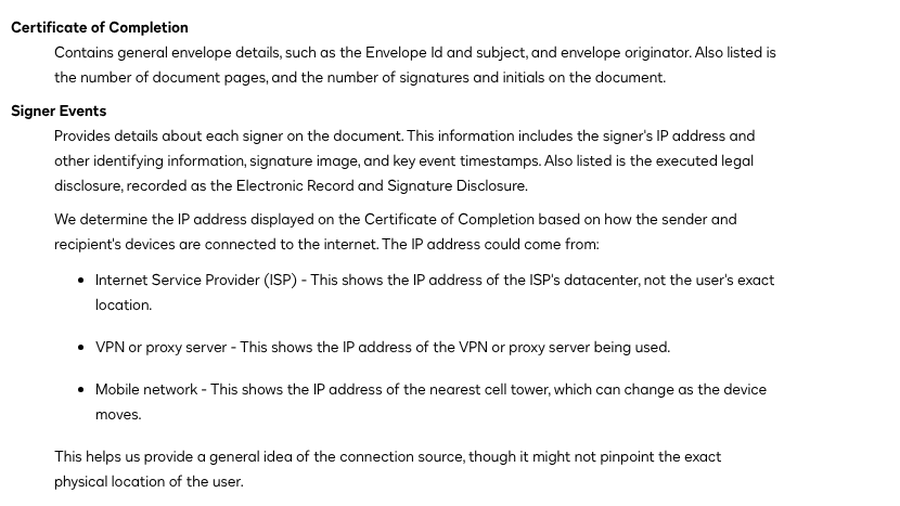
DocuSign’s help page on the certificate says it “provides identifying information about the envelope and complete details of all envelope events.” Every envelope gets its own. It has three parts: general envelope details, events for each signer and other recipient, and a summary of envelope events such as sent and completed.
Senders can download it from the envelope’s details by choosing Certificate of Completion from the download options. If you signed without a DocuSign account, ask the sender for a copy. Other e-signature services keep the same kind of record under different names: Adobe Acrobat Sign calls it an audit report, while DocHub calls it an audit trail. In a May 2026 thread, a DocHub user whose client wanted “legal proof” of a signed contract was pointed to the audit trail download, to send alongside the signed PDF.
Is a DocuSign signature legally binding? Under the federal ESIGN Act, a signature or contract “may not be denied legal effect, validity, or enforceability solely because it is in electronic form.” That does not make every e-signature impossible to challenge. When someone says they never signed, the question becomes who clicked, and the audit trail is the main evidence. As one commenter in a September 2026 r/cybersecurity thread put it, if a signature is contested, the certificate “with its IP and timestamp trail is the artifact people argue over, not the drawn signature.”
7 audit trail details to check on the certificate
1. The envelope ID matches your document
Most DocuSign documents carry an envelope ID stamped at the top of each page, and the certificate lists the same ID. Compare the two. A document whose ID does not match the certificate may not be the version that was signed.
2. The page, signature and initials counts add up
The certificate lists the number of document pages and the number of signatures and initials. Count your copy. An extra page, a missing exhibit or initials on a page you never saw are worth raising before anything else happens.
3. Each signer’s name and email address
Signer events show who signed and the email address the envelope went to. Check that each address is the one you expect. A signature routed to a shared or work inbox means anyone with access to that inbox could have clicked. The seller in the September thread said their email was listed but they never opened the envelope, and commenters suggested checking the email account’s access logs.
4. The security level
This is the line most people skip. Many certificates, including ones attached to 2026 SEC filings, read “Security Level: Email, Account Authentication (None).” That means the signer was identified only by access to the email. Senders can require more, such as an access code, a code sent by SMS or phone, or ID verification. For a home sale, a loan or anything you would want to defend in court, ask for stronger authentication before you send or sign.
5. The IP address, read with care
DocuSign records an IP address for each signer, but it explains that the address may belong to an internet provider’s data center, a VPN or the nearest cell tower. It “might not pinpoint the exact physical location of the user.” Treat it as a clue. A signing IP in another country is worth a question, while a city that looks slightly off usually is not. Not every service records it either. Adobe’s Acrobat Sign help page says its audit report does not record IP addresses by default unless an administrator turns the option on.
6. Timestamps and the order of events
The summary shows when the envelope was sent, viewed, signed and completed. Look for a signature that landed minutes after sending when the signer says they were busy, or events that appear out of order. If an envelope was corrected after it went out, DocuSign adds an “Envelope Updated” event for each change, a sign that the document may differ from the first version a signer saw.

7. The electronic records disclosure
If a signer accepted the sender’s electronic record and signature disclosure, DocuSign appends it to the certificate with the acceptance date. If the account did not require one, the certificate says “Not Offered via Docusign.” This matters most in consumer deals. Under ESIGN, when a law requires a business to give a consumer information in writing, it can send that information electronically only after the consumer consents following a clear disclosure.
Check that the PDF itself was not changed
DocuSign says it places a tamper-evident digital seal on envelopes signed through its service when a sender or signer downloads them, to help show the file was not altered after signing. Open the completed PDF in Adobe Acrobat Reader and look at the signature panel. If it warns that “at least one signature has problems,” DocuSign’s support site says that can happen when your computer has not been set to trust DocuSign’s root certificate, so that warning alone does not prove tampering. A warning that the document was altered or corrupted after signing is the one to take seriously.
Before you sign: is the DocuSign email real?
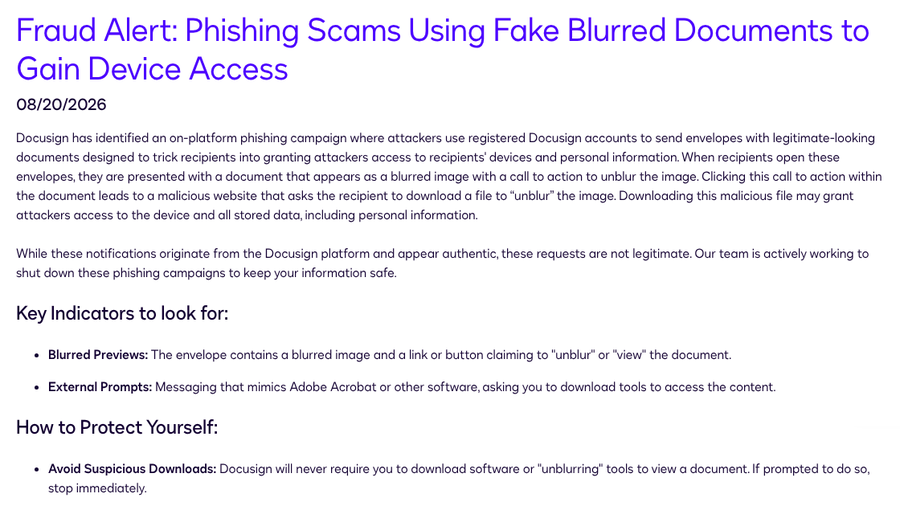
A real DocuSign email no longer guarantees a real sender. In an August 2026 fraud alert, DocuSign said attackers used registered DocuSign accounts to send envelopes showing a blurred document and a prompt to “unblur” it, which led to a malicious download. DocuSign says it will never require you to download software to view a document.
Other fakes never touch DocuSign at all. In April 2026, a Reddit user described a convincing DocuSign-style email that came from an unrelated Japanese domain, with a link leading to a Microsoft sign-in page. DocuSign’s advice for any envelope you are unsure about is to skip the links, go to docusign.com, choose Access Documents and enter the security code at the bottom of the email. If the envelope is unexpected, contact the sender through a phone number you already know, and forward suspicious messages to [email protected]. Our breakdown of fake invoice tactics that trick small businesses covers the same playbook aimed at accounts payable.
If the audit trail shows a signature you did not make
- Get the full certificate as a PDF. A screenshot of a few rows is not enough to compare events.
- Match the timeline. Compare the timestamps and device details with where you were and what you were using.
- Check your email account. Review its sign-in history for access you do not recognize, then change the password and turn on two-step verification.
- Put it in writing. Tell the sender and DocuSign support that you dispute the signature, and keep copies of every message.
- Talk to a lawyer early. If money or property is involved, get advice before the deal closes, not after.
Reading the audit trail pairs well with reading the agreement itself. Our list of lease renewal addendum clauses to read before signing is a good place to start for rental paperwork.
This article is for general information only and is not legal advice. E-signature rules differ by state, country and type of document, so talk to a licensed attorney about a specific agreement or dispute.
Key Takeaways
- The certificate of completion is DocuSign’s audit trail, and it is the record people rely on when a signature is disputed.
- Check the envelope ID and page counts first, then the signer emails, security level and timestamps.
- “Email, Account Authentication (None)” means anyone with inbox access could have signed, so ask for stronger checks on high-stakes deals.
- A genuine DocuSign email can still come from a scammer, so open unexpected envelopes through docusign.com with the security code.
Frequently Asked Questions
What is a DocuSign certificate of completion?
A DocuSign certificate of completion is the audit trail for an envelope. It records the envelope ID and page counts, plus each signer’s email, security level, IP address and timestamps.
How do I get a DocuSign certificate of completion?
Senders can download it from the envelope’s details by selecting Certificate of Completion in the download options. If you signed as a recipient without a DocuSign account, ask the sender to send you a copy of the certificate.
Is a DocuSign signature legally binding?
In the U.S., the ESIGN Act says a signature cannot be denied legal effect only because it is electronic, so DocuSign signatures are generally enforceable. Some documents, such as wills and certain family law papers, are excluded, and a signer can still dispute who clicked.
What is a DocuSign envelope ID?
A DocuSign envelope ID is the unique identifier for a set of documents sent for signature. It usually appears at the top of each page and on the certificate of completion, and matching the two helps confirm you have the signed version.
Does a DocuSign certificate show where someone signed?
The certificate shows the IP address used for each signing event, not an exact location. DocuSign says the address may belong to an internet provider’s data center, a VPN or a cell tower, so it gives only a general idea of the connection source.
The Bottom Line
Download the certificate of completion for every agreement that matters and file it with the signed PDF. Spend two minutes checking the envelope ID, the counts, the email addresses and the security level. If you send documents, turn on an access code or ID check for anything you might need to defend later. And if a DocuSign email shows up unannounced, open it through docusign.com, not the link.
Related Posts