Tap to pay not working but your card works? Why a phone tap gets declined while the plastic card goes through, how to tell whether the phone, the terminal or the bank is the problem, and what to try at the register.
The line behind you is growing. You hold your phone to the reader, it buzzes, and the screen says declined. You pull the same card out of your wallet, insert it, and it goes through on the first try. It is one of the more confusing checkout moments, because the account behind both is the same. When tap to pay is not working but your card works, the cause almost always sits somewhere between your phone, the terminal and your bank’s fraud rules. Most of it can be sorted out in a few minutes.
Bottom Line First
Tap to pay usually fails while the physical card works for one of three reasons: the phone sends a separate device card number that your bank treats differently, the terminal does not take contactless payments on your card network, or the phone was not unlocked and ready. PIN prompts, new cards and transit blocks cause most of the rest. If a slower second tap fails, use the chip and call your bank.
Table of Contents
Phone, terminal or bank? A quick way to tell
| What you see | Likely cause | What to try |
|---|---|---|
| Nothing happens at the reader | Phone locked, NFC off or wrong default wallet | Unlock, open the wallet and hold the top of the phone to the reader |
| Terminal says “try again” | Phone moved too fast or a thick case | Rest the phone on the reader for a few seconds |
| Check mark on your phone, cashier says declined | The terminal or bank rejected it after your phone sent the details | Try another reader, then check your bank app |
| Terminal asks you to insert or swipe | No contactless support for your card network, or a security fallback | Use the chip or another card |
| Your phone asks for a PIN | Unsupported unlock method | Enter your phone’s screen lock PIN, never your card PIN |
| A transit gate rejects both phone and card | Unpaid fare block | Contact your bank, then the transit agency |
A check mark on your phone means it handed over the payment details. The terminal and your bank still decide whether to approve the sale, which is why the phone can look happy while the register says no.
7 reasons tap to pay is not working when your card works
1. The terminal does not take contactless for your card network
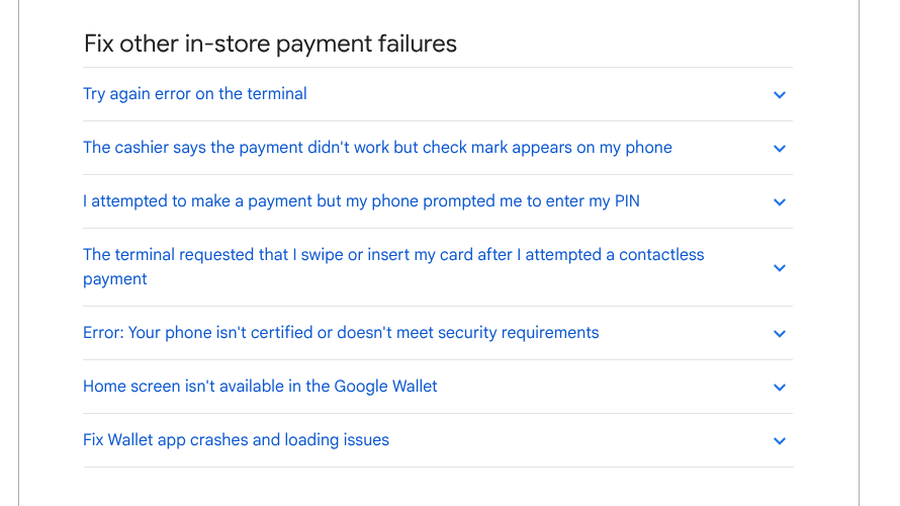
Google’s Wallet help page explains that a terminal “might support contactless payments for some networks (like Visa or Mastercard) but not the specific network of the card you are using (like Amex or Discover), even if the terminal accepts that network via chip or swipe.” When that happens, the reader asks you to insert or swipe instead.
Mismatches between one card and one kind of terminal happen with debit cards too. In a May 2026 thread, SoFi debit cardholders described tap declines at certain bars, and one said it happened at two places using Toast terminals, where even the chip failed. A problem tied to a single terminal type is one for the bank to investigate, so tell it where and when it happened.
2. Your phone was not ready to pay
On Android, Google lists the basics: NFC turned on, Google Wallet set as the default payment app, a screen lock set and the phone unlocked before you pay. On an iPhone, Apple’s steps are to double-click the side button, authenticate with Face ID or your passcode, and hold the top of the phone near the reader until Done and a check mark appear. If too much time has passed since you last unlocked, the phone may ask you to verify again. Google also says phones that are rooted or run modified factory software cannot make contactless payments at all.
3. The tap was too quick or too far away
A “try again” message usually means the connection dropped partway through. Google says moving the phone too quickly, holding it too far from the reader or using a thick phone case can interrupt the NFC signal. Rest the phone on the reader for a few seconds. The antenna sits near the top of an iPhone and near the top or middle of most Android phones, so line it up with the contactless symbol on the terminal.
4. Your phone pays with a different number than your card
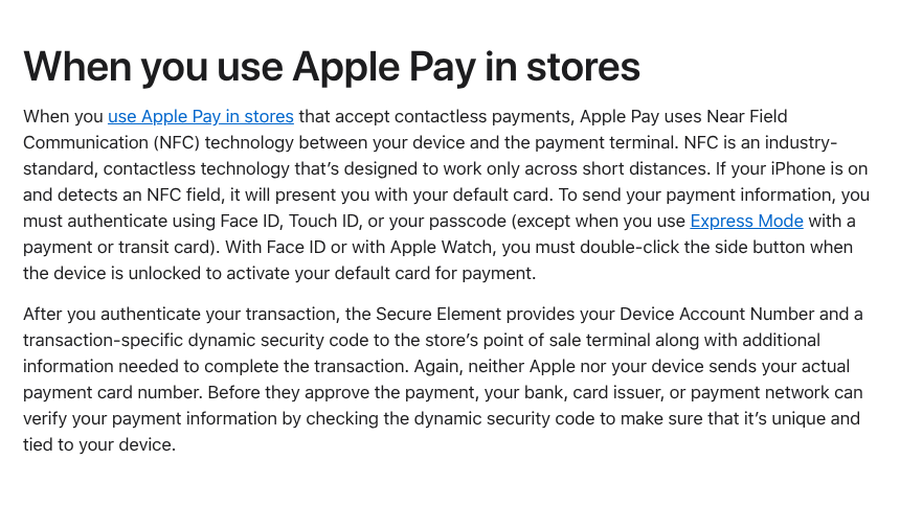
This is the cause most people never hear about. When you add a card to Apple Pay, your bank creates a device-specific Device Account Number. According to Apple’s Apple Pay security overview, the phone sends that number and a one-time security code at checkout, and “neither Apple nor your device sends your actual payment card number.” Google says its wallet does the same, sending a Device Account Number instead of your real card details. Your bank can apply different rules to that device number than to the plastic.
That explains many “card works, phone doesn’t” stories. In April 2026, a Bilt cardholder on Reddit said Apple Pay was declined on a purchase of over $1,000 at a home improvement store, and the physical card went through right after. The most useful reply was the simplest: call the number on the back of the card and ask whether there are restrictions on mobile wallet payments.
5. The terminal or your phone wanted a PIN
PIN prompts cause confusion in two ways. If your Android phone asks for a PIN, Google says it wants your phone’s screen lock PIN, and you should not enter your card PIN on the terminal. Some terminals, especially gas pumps, also ask for a PIN or ZIP code after a tap. In the same Bilt thread, another cardholder said Apple Pay declines happened to them at gas pumps and suspected a PIN request was the trigger. If a pump keeps rejecting your phone, pay inside or use the chip.

6. The card is new, replaced or recently added
Replacement cards cause a surprising share of wallet problems. In a September 2026 Google Wallet thread, one person said a new card from their bank would not work in Google Wallet even though the old one had. Commenters suggested checking that the contact details on the card account match your Google Payments profile, and adding the card from the bank’s own app if it offers that option. In a January 2026 thread, another person said their bank’s fraud protection shut down a new card after it failed to add to the wallet too many times. If a card will not add after two or three tries, stop and call the bank.
7. A transit system blocked the card
Tap-to-ride systems keep their own records. New York’s OMNY blocks a payment method that has an unpaid fare. Its OMNY FAQ says to contact your bank to fix any issue with the card, then call OMNY customer service to reauthorize unpaid fares, and that the card can take up to 15 minutes to be accepted again. In August 2026, an OMNY rider on Reddit said both their credit and debit cards kept getting rejected over an outstanding balance, lasting only a few days between reactivation and the next block. Commenters suggested a separate OMNY card that reloads from a credit card, so it is easier to see which side is failing.
What to do at the register when tap to pay fails
- Tap once more, slowly. Unlock the phone first, then rest it on the reader until the check mark appears.
- Read the terminal. “Insert card” points to the terminal or card network, while “declined” usually points to the bank.
- Use the chip. It keeps the line moving and confirms the account itself is fine.
- Open your bank app. Look for a fraud alert or a declined transaction you can confirm.
- Call the issuer later. Ask about limits on mobile wallet payments and confirm that your phone’s card is active.
- Re-add the card last. Remove and add it again only once, since repeated failed attempts can trigger fraud checks.
Paying abroad brings its own rules, as our guide to China travel payments, apps and ID checks shows. And if you pay with debit on the road, our list of hotel deposit questions to ask before using debit covers the holds that can leave a card short at checkout.
This article is for general information only and is not financial advice. Card issuer rules, wallet features and terminal setups vary, so contact your bank or card issuer about declines on your account.
What To Know
- Your phone pays with a device account number, so your bank can decline a tap while approving the plastic card.
- A request to insert or swipe often means the terminal does not take contactless for your card network.
- Unlock the phone first, rest it on the reader and never type your card PIN after a phone prompt.
- New cards, repeated add attempts and unpaid transit fares can all block a wallet card until the bank or agency clears it.
Frequently Asked Questions
Why is Apple Pay declined when my card works?
Apple Pay uses a device-specific Device Account Number instead of your card number, and your bank can apply different fraud rules or limits to it. Terminals that do not accept contactless payments on your card network can also reject the phone while taking the chip.
Why does the terminal ask me to insert my card after I tap my phone?
A request to insert or swipe after a tap usually means a security fallback or that the terminal does not support contactless payments for your card network, even if it accepts that network by chip. Try again with the phone unlocked or use the chip.
Why is tap to pay not working on my Android phone?
Check that NFC is on, Google Wallet is your default payment app, a screen lock is set and the phone is unlocked. Google Wallet also does not work on rooted phones or phones running modified operating systems.
Why does my phone ask for a PIN when I tap to pay?
If an Android phone asks for a PIN during a tap, it wants your phone’s screen lock PIN because the unlock method used was not supported. Do not enter your card PIN on the terminal.
Why is my card declined at OMNY turnstiles?
OMNY blocks cards and devices that have an unpaid fare. Contact your bank to resolve any card issue, then call OMNY customer service to reauthorize the fare. It can take up to 15 minutes for the card to work again.
Final Takeaway
Treat a failed tap as a clue rather than a verdict on your account. If the terminal asks for the chip, the problem is the reader or the network. If the phone shows a check mark and the register still says declined, the answer sits with your bank. Pay with the card so you can leave, then call the issuer and ask about the device card number. Most wallet declines get fixed in one phone call.
Related Posts