Six TripIt alternatives that turn forwarded confirmation emails into a full itinerary, without asking for access to your mailbox.
TripIt made its name on one trick: send it a booking email and your trip appears. The easiest version of that trick, Inbox Sync, connects TripIt to your email account so it can find confirmations on its own, which means handing a travel app standing access to everything else in your inbox too. Frequent flyers also had a rough 2026 with TripIt. On June 23, many users reported that even emails forwarded to TripIt’s import address were not showing up, some for about a day. If you want auto-import without the inbox access, these six TripIt alternatives work from forwarded emails or uploads instead.
The best TripIt alternatives in 2026 are:
- Tripsy: best full TripIt replacement
- TripWaffle: best free forwarding-only itinerary app
- Flighty: best for flight tracking without inbox scanning
- AwardWallet: best for points and elite-status collectors
- Stippl: best for shared trips with budgets and packing lists
- Mindtrip: best for planning with AI around your bookings
Quick Picks
| App | Best For | Price | How Import Works | Live Flight Alerts | Platforms |
|---|---|---|---|---|---|
| Tripsy | Full TripIt replacement | Free; Pro $59/yr | Forwarding (Pro), file and link import | Gate and delay alerts (Pro) | iPhone, Mac, Android, web |
| TripWaffle | Free forwarding | Free | Forwarding; emails auto-delete | Gate, delay, baggage belt | iPhone, Android, web |
| Flighty | Flights only | Free; Pro $59.99/yr | Forwarding (Pro), calendar, TripIt | Yes, with delay predictions | Apple devices only |
| AwardWallet | Points collectors | Free; Plus $49.99/yr | Forwarding or mailbox connection | Not the focus | iPhone, Android, web |
| Stippl | Shared trip planning | Free; Pro €4.99/mo | Forwarding (Pro) | Not listed | iPhone, Android, web |
| Mindtrip | AI trip planning | Free | Forwarding or upload | Not listed | iPhone, web |
Table of Contents
Why travelers look for TripIt alternatives
Privacy is only part of it. TripIt Pro costs $49 a year after a 30-day trial, and the app belongs to SAP Concur, whose focus is business travel. Longtime users in an online TripIt community have spent 2026 describing a product that feels neglected. One wrote in March that the calendar feed no longer synced to Office 365 and that manual trip entry was failing. Another called the design “VERY stale.” None of that makes TripIt unusable, but it explains why switchers want an app that treats email import as a core feature and keeps improving it.
1. Tripsy
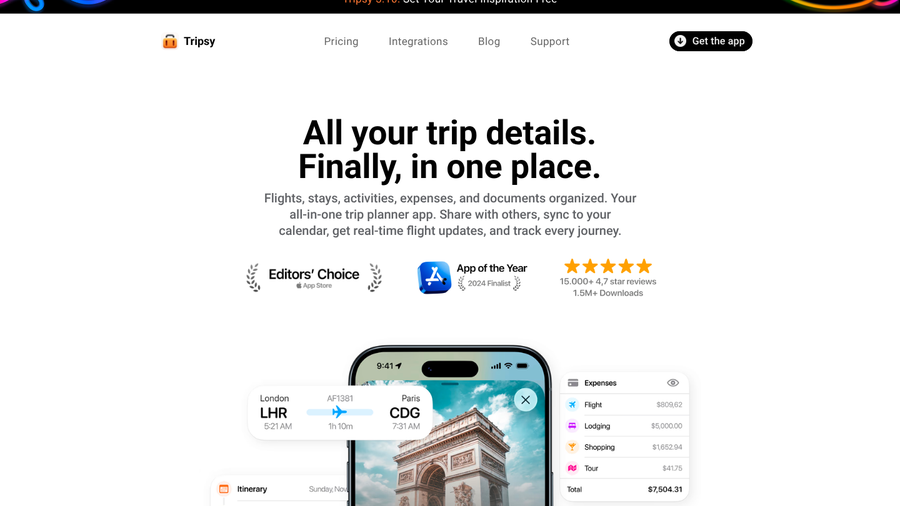
Best for: iPhone and Mac users who want a like-for-like TripIt replacement covering flights, stays, documents and expenses.
Tripsy is the app TripIt switchers mention most, and it earns that by covering the whole trip rather than the flights alone. Its site lists more than 15,000 reviews averaging 4.7 stars and over 1.5 million downloads, and it has been an App Store Editors’ Choice. It can also import your history from TripIt and TripCase, so moving over does not mean retyping years of trips.
Auto-import works by forwarding. You forward reservation emails to Tripsy and the flights, hotels and activities appear on the right trip. Smart Import goes further. It reads PDFs, screenshots and web links, and it can pull in saved Google Maps or Apple Maps lists and even travel posts from Instagram or TikTok. None of it requires connecting your mailbox.
The free plan covers unlimited trips, cloud sync, sharing with guests and expense tracking, which makes Tripsy useful for splitting costs on group trips. Forwarding, Smart Import, flight alerts for gate changes and delays, the calendar feed and document storage sit behind Pro, along with a 10-day weather forecast, time zone change notes and data export. Tripsy’s team told one user in September 2026 that its flight updates, including terminal and gate details, arrive within the 48 hours before departure, so it is not a second-by-second flight tracker.
The most common complaint from people coming from TripIt is the layout. Tripsy organizes trips day by day, and some longtime TripIt users find it harder to scan a long trip at a glance than TripIt’s timeline. Tripsy also connects to AI assistants such as ChatGPT and Claude, which some users lean on to build a compact overview of a long trip.
- Pros: Covers the whole trip, including documents and expenses; imports TripIt history; web and Android versions.
- Cons: Forwarding and flight alerts need Pro; day-by-day view is less compact than TripIt’s timeline.
Pricing: Free plan. Tripsy Pro costs $59 a year, and a one-time $299 option can be shared with family.
2. TripWaffle
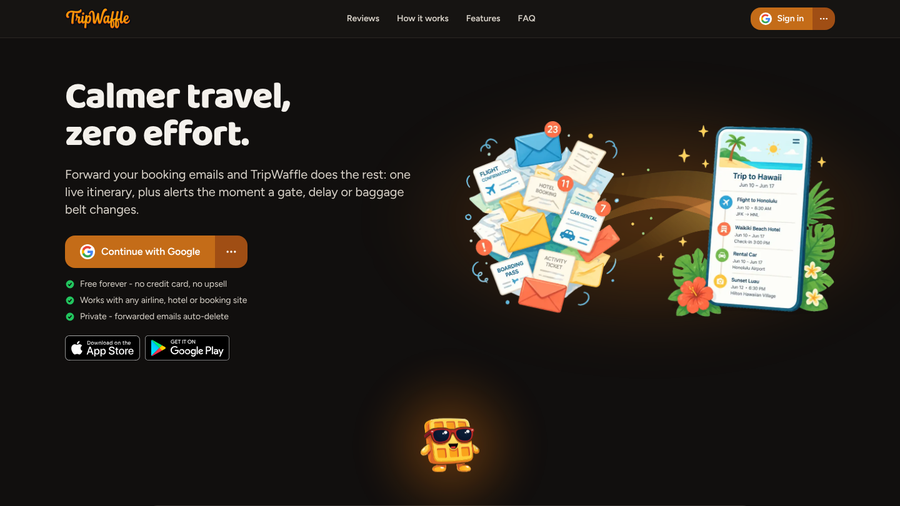
Best for: Travelers who want forwarding-based import, calendar feeds and flight alerts without paying anything.
TripWaffle was built for one job: forward a booking email and get a live itinerary back. It says it works with any airline, hotel or booking site, and it covers trains, restaurants, tours and car hire as well as flights and stays. For privacy, TripWaffle says forwarded emails auto-delete once they are processed, and sign-in uses Google, Apple or a one-time email code rather than a password.
The feature list reads like a direct answer to TripIt’s weak spots. Calendar feeds subscribe in Google, Apple or Outlook calendars, and an offline copy and print view cover patchy connections. Push or email alerts flag gate changes, delays, baggage belts and check-in windows. If you are leaving TripIt, Flighty or TripCase, you can import your history. You can also connect Claude or ChatGPT to add plans by chat.
Everything is free. The FAQ says there may be a “pro plan” one day, but for now there is no card and no upsell. Setup is short, too: the App Store listing describes it as signing in with Google or Apple and forwarding your first booking, which suits people who found TripIt’s setup fiddly.
The catch is age. TripWaffle’s iPhone app had only 26 ratings in late September 2026, and much of its reputation comes from recommendations in TripIt forums rather than a long public track record. It also warns that parsing results “may vary by language, format, or provider quirks.” Forward your next booking to TripWaffle and to your current app for a trip or two before you rely on it alone.
- Pros: Free with no upsell; forwarded emails auto-delete; calendar feeds for Google, Apple and Outlook.
- Cons: Very new, with a short track record; no stated plan for how it will pay for itself.
Pricing: Free on iPhone, Android and the web.
3. Flighty
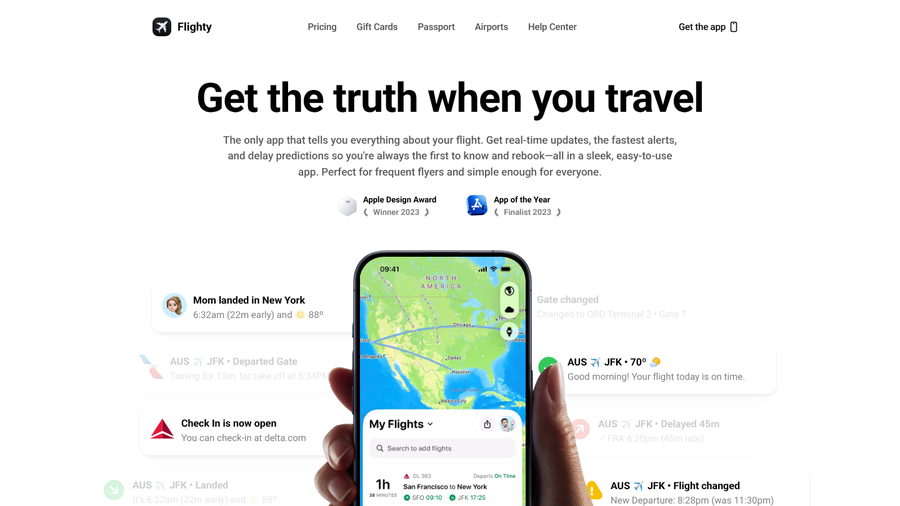
Best for: Frequent flyers on Apple devices who care most about flights and want the strictest line on email privacy.
Flighty takes the clearest privacy position on this list. Its help center states plainly, “We do not scrape your inbox,” and explains that for privacy reasons every email has to be forwarded by hand. You turn on Add Flights via Email in settings, then forward airline confirmations as you book. Flighty can also pull flights from your calendar or sync with an existing TripIt account while you transition. If it cannot confidently read an email, it sends a notification, and you add that flight through search instead.
Where Flighty pulls ahead of TripIt is what happens after the flight is added. It predicts delays caused by a late-arriving aircraft up to six hours before the airline announces them, explains air traffic control holds and weather issues, and sends gate and delay alerts that Flighty says reach you “before anyone else, even the pilot.” It won an Apple Design Award in 2023.
There are two real limits. Flighty tracks flights and nothing else, so hotels, trains and rental cars need a second app. It also runs only on Apple devices, including iPhone, iPad and Mac, and Flighty says it has no current plans for Android. Email import is part of Flighty Pro, although every Pro feature is free for your first flight, and confirmations sent straight from major airlines parse best.
Many frequent flyers pair Flighty with a trip app from this list: Flighty for the flight itself, the other app for the rest of the trip.
- Pros: Never scans your inbox; delay predictions and fast gate alerts; free unlimited flight tracking.
- Cons: Flights only; Apple devices only; email import requires Pro.
Pricing: Free flight tracking. Flighty Pro costs $4.99 a month or $59.99 a year, with every Pro feature free for your first flight.
4. AwardWallet
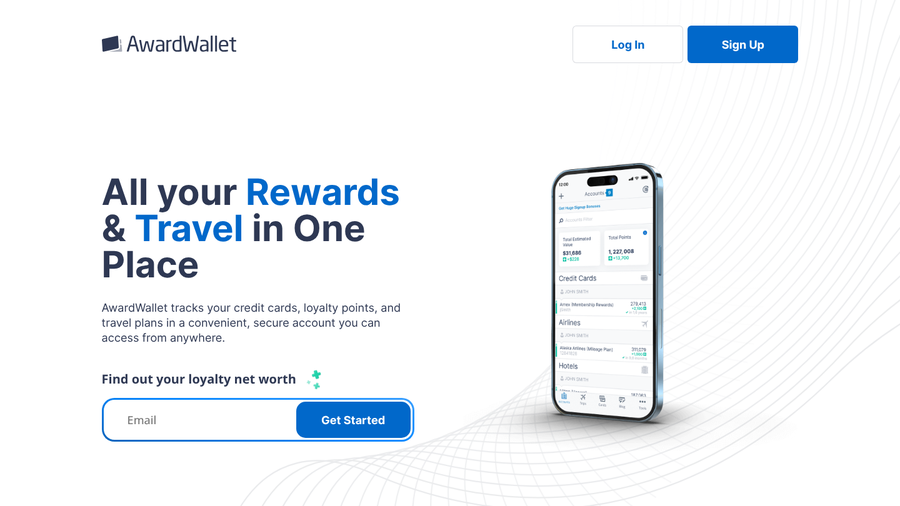
Best for: Points and elite-status collectors who want their trips listed next to their loyalty balances.
AwardWallet started as a points tracker and still leads with that. It follows 602 loyalty programs, flags points and free-night certificates before they expire, and tracks elite status across airlines, hotels and credit cards. Trips come in as a master itinerary, and the site gives you two ways to feed it: connect your email, or forward your travel plans.

That choice matters for this list. AwardWallet’s own FAQ explains that its most automatic travel planning relies on keeping access to a connected Gmail mailbox. If you do not want that, forwarding confirmations keeps the itinerary working without the mailbox link, at the cost of doing the forwarding yourself. A sensible middle ground is to leave the mailbox connection off and forward only travel confirmations. For a points collector who already opens AwardWallet weekly, having trips and balances in one account is the draw. AwardWallet dates back to 2004, and its homepage says it now tracks 233 billion points for members.
The free plan limits each loyalty account to two balance updates every 24 hours. AwardWallet Plus removes that cap, adds real-time Balance Watch alerts and an ad-free experience. Balance Watch helps when you transfer points for an award seat, because AwardWallet checks the account often and alerts you the moment the points arrive, and the desktop version lets one person manage points and travel plans for a whole family.
As a pure itinerary app, AwardWallet is the weakest here. Trip organization is a supporting feature, and travelers who do not collect points will find the rest of the app unnecessary.
- Pros: Trips and 602 loyalty programs in one account; forwarding works without mailbox access; family management.
- Cons: Itinerary features are secondary; the most automatic setup uses a connected Gmail mailbox.
Pricing: Free plan. AwardWallet Plus costs $49.99 a year.
5. Stippl
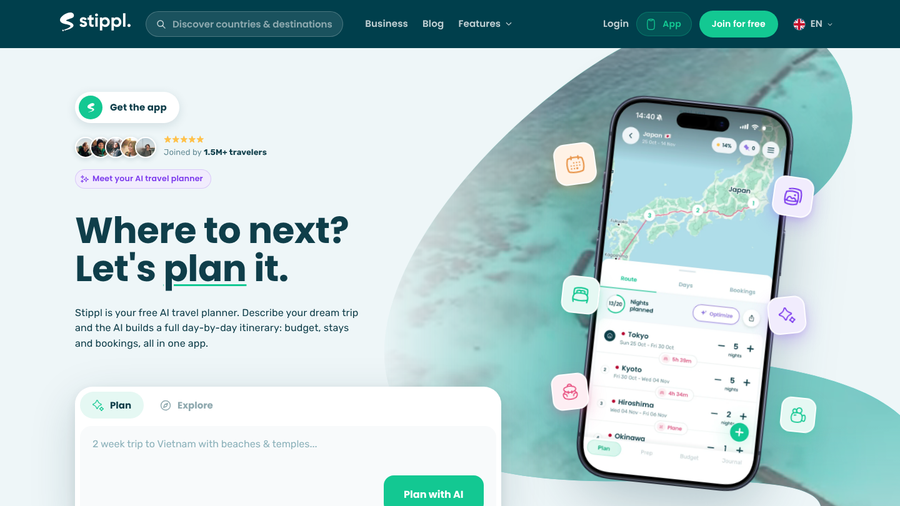
Best for: Couples, friends and families planning multi-stop trips who want the route, budget and packing list in one shared plan.
Stippl approaches the problem from the planning side. You map a route across several stops, add stays and bookings, and keep a budget, packing list and travel journal in the same trip, with collaboration for everyone coming along. Stippl says more than 1.5 million travelers have joined, and its App Store rating is 4.7 from over 8,000 reviews.
Most of that is free for good, including unlimited trips, cloud sync, offline access and budget tracking. Auto-import sits in Stippl Pro: forward any booking confirmation and flights, hotels and restaurants are added to the trip. Pro also adds calendar sync, PDF export and unlimited AI trip generation. You can export the trip budget as a CSV with your own expense categories, save packing lists to reuse on later trips and add up to 10 photos per destination to the trip reel, against three on the free plan. That matters for people who keep a separate spreadsheet, since typos in a copied booking are one of the most common travel budget spreadsheet errors.
Stippl also sells local data plans for more than 190 countries inside the app, which saves a separate eSIM purchase on longer trips. The free plan includes curated trips you can copy and adapt, and because Pro is billed monthly, you can pay only for the months you are traveling.
For a road-warrior business traveler, Stippl is the wrong shape. It does not list live flight alerts, and it is built for trips you plan in detail, not the fifteenth same-day flight of the year.
- Pros: Strong free plan; shared planning with budgets and packing lists; data plans for 190+ countries.
- Cons: Forwarding requires Pro; no live flight alerts listed.
Pricing: Free plan. Stippl Pro costs €4.99 a month, cancel anytime.
6. Mindtrip

Best for: Travelers who plan by chatting with an AI assistant and want confirmations stored next to their ideas.
Mindtrip is an AI travel planner first and an organizer second. You describe a trip in chat, browse suggestions with photos, reviews and maps, and save the places you like to a plan. Receipts fit into that flow: upload a confirmation or forward it to [email protected], and it is organized with the rest of the trip. Forward each booking as soon as you make it, and the plan and the paperwork stay together without a separate folder of screenshots.
The planning tools are the reason to choose it. You can import your saved Google Maps places as a themed collection, start a trip from a photo, screenshot or PDF, and invite friends or family into a group chat to build one itinerary together instead of arguing in a group text. It also shows what is happening nearby, from concerts to farmers’ markets.
Mindtrip is free to use, which makes it easy to test alongside a dedicated organizer. Forward one real confirmation first and check that the dates, times and confirmation number come through correctly. You can also browse popular itineraries other travelers have built, favorite the stops you like and add them to your own plan, or share travel content and let Mindtrip turn it into a list.
For a frequent flyer, Mindtrip does not replace TripIt on its own. It does not list live flight alerts, and its strengths are inspiration and group planning rather than tracking a dense travel calendar. Pair it with Flighty for flights, or use it for leisure trips while a dedicated app handles work travel.
- Pros: Forward or upload receipts without mailbox access; Google Maps import; group planning chat.
- Cons: No live flight alerts listed; better for planning than for a heavy travel calendar.
Pricing: Free.
How We Chose These
Every app here had to import bookings automatically without requiring standing access to your mailbox, through a forwarding address, a file upload or both. We then compared what each one does with a booking once it arrives: flight alerts, calendar feeds, sharing and offline access. We weighed price, platform coverage and track record, including whether an app can bring in your old TripIt trips. Services that only work by scanning a connected inbox were left out, and so was TripCase, Sabre’s free itinerary app, whose website now redirects to an “unavailable” page. For a wider look at booking tools, see our guide to Booking.com alternatives with upfront fees.
The Bottom Line
If you want one app to replace TripIt, choose Tripsy and pay for Pro to get forwarding and flight alerts. If you want the same idea for free and do not mind a young app, TripWaffle is the pick, and its auto-deleting forwarded emails are a good privacy default. Heavy flyers on Apple devices should add Flighty regardless, since no trip organizer here matches its flight alerts. Choose AwardWallet if your trips and points already live in the same head, Stippl for shared multi-stop trips and Mindtrip if you like planning with AI. You can also keep TripIt and simply leave Inbox Sync off: forwarding to [email protected] still works without it.
Frequently Asked Questions
What is the best TripIt alternative?
Tripsy is the best TripIt alternative for most travelers because it covers the whole trip, including documents and expenses, and it can import your TripIt history. Its email forwarding and flight alerts require Tripsy Pro at $59 a year.
Can I use TripIt without giving it access to my email?
You can use TripIt without Inbox Sync. Forward confirmation emails to [email protected] and TripIt adds them to your trips without connecting to your mailbox.
Is Flighty better than TripIt?
Flighty is better than TripIt for tracking flights, with delay predictions and fast gate alerts, and it never scans your inbox. TripIt is better for whole trips, because Flighty does not track hotels, cars or other reservations and only runs on Apple devices.
Is there a free TripIt alternative with email forwarding?
TripWaffle and Mindtrip both accept forwarded confirmation emails for free. Tripsy and Stippl have free plans too, but their forwarding features require a paid upgrade.
What happened to TripCase?
TripCase, the free itinerary app from Sabre, is no longer available, and its website now redirects to a Sabre “unavailable” page. Tripsy and TripWaffle can both import past trips from TripCase.
Related Posts