What to do when your flight is cancelled and the airline app offers a flight rebooking: the eight screenshots to save before you tap accept, and the U.S. refund rules that make them worth having.
In May 2026, a Southwest passenger flying home from Raleigh with a 2-year-old was still in the air when the airline’s system rebooked them onto a later connection, landing at 10:05 p.m. instead of about 5:30 p.m. They landed, sprinted through Chicago with a backpack and a toddler, and reached the original gate with minutes to spare. They still could not board, because the rebooking had made their original boarding passes invalid, and the app would not let them switch back. Airline apps now make flight rebooking fast. They also make it easy to accept something before you understand what you are giving up.
Bottom Line First
When your flight is cancelled or significantly changed, U.S. rules give you a refund if you choose not to travel and do not accept a voucher or credit. Accept the new flight and that refund right is gone. Before you tap accept, screenshot the original trip, the notice and the new offer. Then capture the refund option, your cabin and bags, any vouchers and your chat with the airline.
Table of Contents
Why flight rebooking in the app can cost you
The U.S. Department of Transportation’s refund rules say you are entitled to a refund if an airline cancels your flight for any reason, or significantly delays or changes it, and you choose not to travel or accept travel credits or vouchers. A significant change includes departing 3 or more hours earlier or arriving 3 or more hours later on a domestic trip (6 hours for international), a different airport, more connections or a downgrade to a lower cabin.
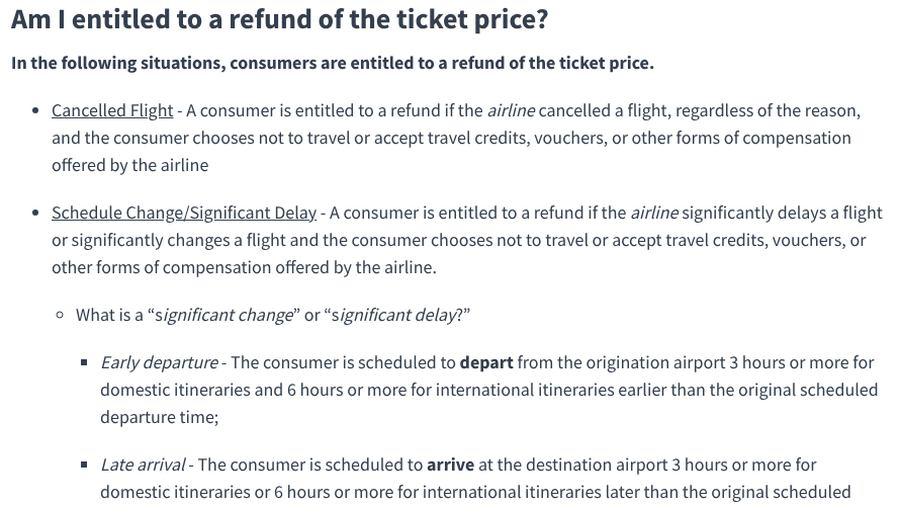
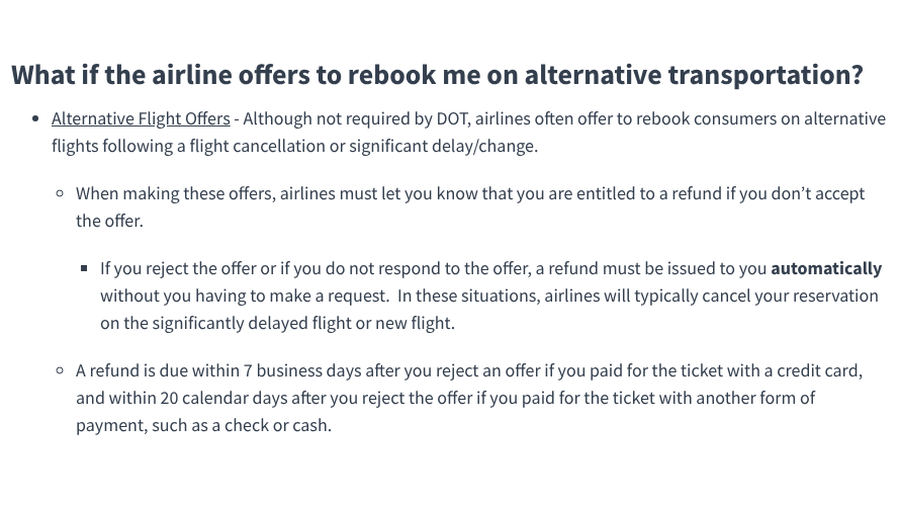
The catch is written as plainly. If you choose to take a significantly changed flight or an alternative flight the airline offers, DOT says you are not entitled to a refund. Airlines offering a rebooking must tell you that you are entitled to a refund if you do not accept. If you reject the offer or do not respond, the refund must be issued automatically, within 7 business days for credit card purchases and 20 calendar days for other payment types. Airlines can also set a deadline for accepting an offer, so read the fine print before it expires.
Screenshots are how you prove what the app showed you when the details get disputed later. Our guide to airline and hotel refund rules covers when money comes back. This list covers what to capture in the moment.
8 screenshots to save before you tap accept
1. The cancellation or delay notice
Capture the push notification, text or email that told you about the disruption, including the time it arrived and any reason given. DOT requires airlines to notify you of cancellations, significant changes and your refund right through the channel you signed up for, including app push notices. Whether the cause was within the airline’s control affects which meals, hotels and other amenities it has committed to provide.
2. Your original itinerary
Screenshot the original flights and times, your cabin and seats, and the confirmation number before anything changes. Once the app updates, the old version can disappear, and you need it to show that the new flights count as a significant change.
3. The rebooking offer itself
Save every option the app shows you, including the ones you do not pick. Note the new departure and arrival times, connections and airports, and compare them with the 3-hour domestic or 6-hour international threshold. If the airline auto-rebooked you, screenshot the new itinerary the moment you see it, then decide.
4. The refund option, or where it should be
Look for the button or link that lets you decline and request a refund, and capture it. If you cannot find one, screenshot the screen that shows only rebooking or credit choices. That image is useful if you later have to argue that you were never offered the refund DOT says you are owed.
5. Your cabin and seat on the new flight
Rebooking systems sometimes move you to a lower cabin without asking. In September 2026, a United passenger booked in paid first class watched the app switch them from a delayed flight to an earlier one in economy, with no warning, while they were at the airport. DOT says a downgraded passenger who still travels is owed the difference between the original fare and the lower fare. Screenshot both cabins.
6. Your baggage allowance
If you are moved to a partner airline, your bag rules can change. In June 2026, an American Airlines passenger whose Tokyo to New York flight was cancelled and moved to Japan Airlines was charged at check-in for luggage included in the original ticket. They got a sports equipment fee dropped but still paid about $70 for another bag. Capture the allowance on your original booking and on the new one.

7. Meal, hotel and ride vouchers
Voucher offers in apps can be wrong, so save the details. In April 2026, a United passenger stuck in Amsterdam after a cancellation was offered hotel vouchers through the app, but every one was in Houston, their destination. In September 2026, easyJet passengers in Naples booked the free hotel in the app, then arrived to find it full at midnight. Screenshot the voucher amount, city, hotel name and expiry.
For U.S. airlines, check what they have promised. DOT’s airline customer service dashboard shows each carrier’s commitments for cancellations it causes, such as a meal voucher when the wait for a new flight is 3 hours or more and a hotel for an overnight cancellation.
8. Your chat with the airline
If an agent promises a refund, a seat or a waived fee in the app chat, screenshot the whole exchange with the agent’s name and the time. Save receipts for anything you pay for yourself.
4 questions to answer before you accept
- Does the new flight still work for your trip? If it lands too late for the event you are traveling for, a refund may be worth more.
- Is it a significant change? Compare the new times and airports with your original screenshot.
- What are you giving up? Check cabin, seats, bags and any paid extras.
- Is there a better option? Ask about other flights or a partner airline before accepting the first offer.
If you keep a trip log, our travel itinerary spreadsheet for schedule changes flags changes big enough to qualify for a refund.
A one-page summary of your rights is coming
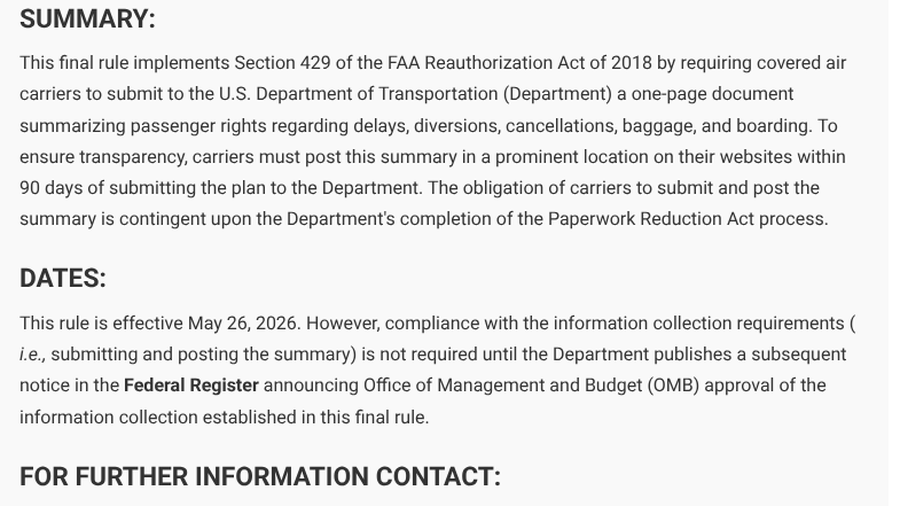
DOT is also working on making these rights easier to find. A final rule published in April 2026 requires covered airlines to submit a one-page summary of passenger rights for delays, diversions, cancellations, baggage and boarding. Airlines must post it prominently on their websites within 90 days of submitting it. The rule took effect May 26, 2026, but airlines do not have to comply until DOT announces the required federal paperwork approval.
This article is general information about U.S. Department of Transportation rules and is not legal advice. Rules differ for flights outside the U.S. and for tickets bought through travel agencies, so check your airline’s contract of carriage and the DOT website for your situation.
What To Know
- Accepting a rebooked flight or a voucher ends your DOT right to a refund for a cancelled or significantly changed flight.
- If you reject or ignore the offer, the refund must be issued automatically within 7 business days for card payments.
- Before accepting, screenshot the original itinerary, the offer and the refund option. Save cabin, bag and voucher details too.
- A downgraded passenger who still flies is owed the fare difference.
Frequently Asked Questions
What should I do when my flight is cancelled?
When your flight is cancelled, screenshot your original itinerary and the airline’s notice, then compare the rebooking offer with a refund. Accept the new flight only if it works for your trip, because accepting it ends your right to a refund under DOT rules.
Can I get a refund if I accept a rebooked flight?
You generally cannot get a refund under DOT rules if you accept a rebooked flight or a voucher. You may still be owed amenities the airline has committed to or a fare difference if you were downgraded.
What counts as a significant schedule change?
DOT counts a change as significant if you depart 3 or more hours earlier or arrive 3 or more hours later on a domestic trip, or 6 hours on an international trip. A different airport, more connections or a lower cabin also count.
Does the airline have to give me a hotel if my flight is cancelled?
U.S. law does not require a hotel, but many airlines have committed to one for overnight cancellations they cause. Check the DOT dashboard and screenshot any voucher the app offers.
What if the airline rebooked me without asking?
Screenshot the new itinerary right away, then check whether it is a significant change. If it is and you do not want it, decline it and request the refund you are owed before the airline’s deadline.
What To Do Next
Before your next trip, turn on the airline’s app notifications and practice taking a full-page screenshot on your phone. Save your original itinerary in a photo album before you fly. If a cancellation hits, take the eight screenshots first and decide second. A few taps now can be the difference between a refund and a flight you never wanted.
Related Posts