How the Zelle business account scam works, the Venmo and Cash App versions, five more fake payment tricks aimed at sellers, and what to do if you already clicked.
In March 2026, a Facebook Marketplace seller on Reddit reported that three different accounts had tried the same move on them within 24 hours. The first buyer wanted to pay by Zelle and send her sister to collect the item the next day. Soon an email “from Zelle” arrived, but the sender turned out to be a Gmail address. The seller called the number in the email and reached a fake Zelle support agent, who tried to walk them through sending $500 to a new recipient. While that call was still going, a second number rang, also claiming to be Zelle. That is the Zelle business account scam, one of several tricks built to make sellers pay to get paid.
The Short Version
In the Zelle business account scam, a fake buyer claims to have paid you, then a fake email says the money is on hold until you upgrade to a business account, usually by sending money yourself. Zelle says there are no upgrades. The same script runs with Venmo and Cash App. A real buyer never needs your card number, a code or a fee from you to pay you.
Table of Contents
Why sellers are a target
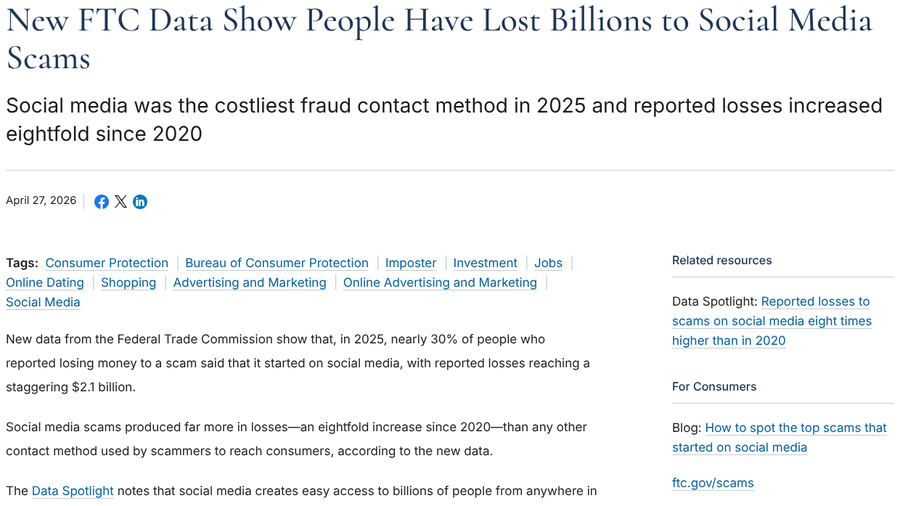
Social media is now the costliest way scammers reach people. New FTC data released in April 2026 show that nearly 30% of people who reported losing money to a scam in 2025 said it started on social media, with $2.1 billion in reported losses. People reported losing more money to scams that started on Facebook than on any other platform, and far more than to text or email scams.
Sellers make an easy mark because they are waiting for money, and a payment that looks stuck creates instant urgency.
How the Zelle business account scam works
The pattern shows up again and again in seller reports from 2026:
- An eager buyer appears. They often message outside the normal listing chat and agree to your price without haggling.
- They want to pay before pickup. A relative, friend or mover will collect the item because they are out of town.
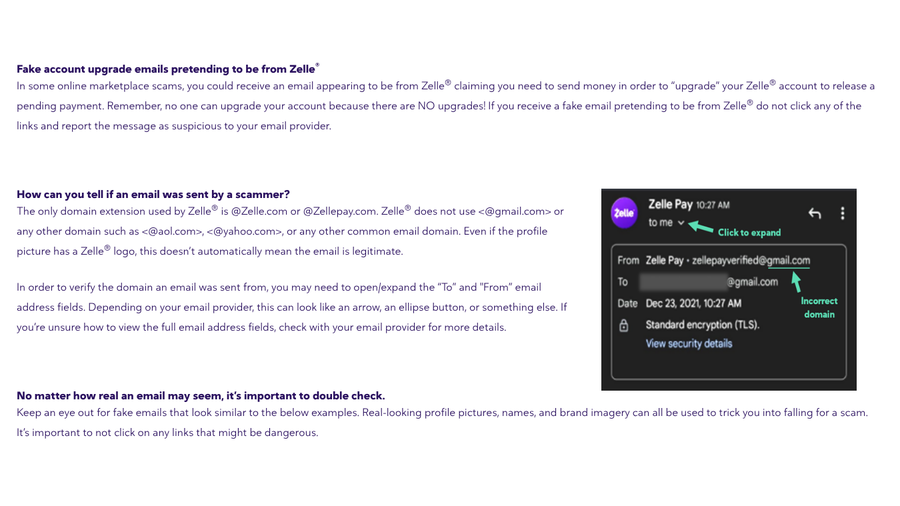
- They ask for your email. A phone number would work for Zelle, but an email address lets them send you fake Zelle messages.
- A fake email says the payment is pending. It claims your account must be upgraded to a business account before the money can be released, and it often asks you to send money for the upgrade with a promise of a refund.
- A fake support line closes the deal. The email lists a phone number, or the buyer offers to contact “Zelle business support” for you.
Zelle’s own guide to online marketplace scams is direct about it: “no one can upgrade your account because there are NO upgrades!” It adds that Zelle only sends email from @Zelle.com or @Zellepay.com addresses and never from Gmail, AOL or Yahoo accounts.
The damage can go well beyond one payment. In May 2026, a seller who listed a mattress described screen-sharing their phone with a scammer over FaceTime while being coached through opening a Cash App account and trying to send money. They stopped before any money left, then froze their credit, had their bank open a new account, changed their email password and closed their payment apps.
The Venmo business account scam and Cash App versions
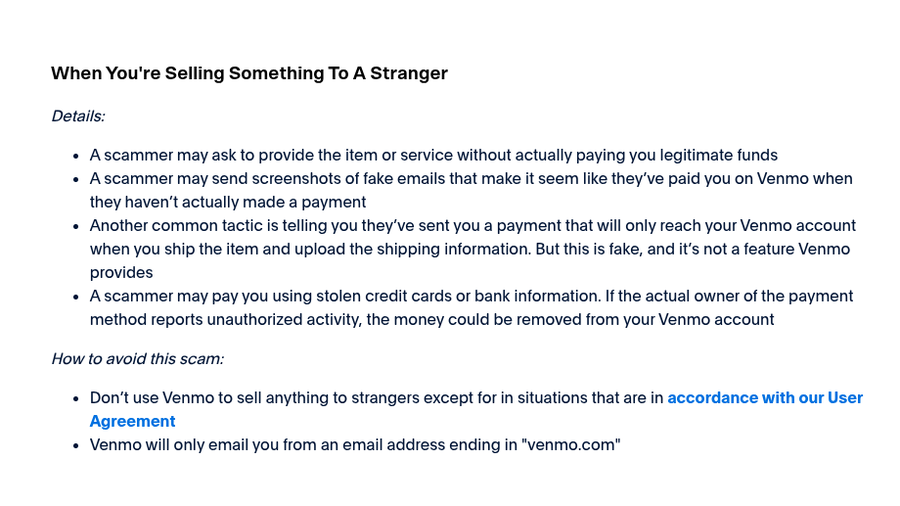
Venmo does offer real business profiles, which makes a fake “upgrade to business” email more believable. Venmo’s help page on common scams lists what sellers see from strangers: screenshots of fake emails that make it look like a payment was sent, and claims that a payment will only reach your account once you ship the item and upload tracking. Venmo says that second one is fake and “not a feature Venmo provides.” It also notes that Venmo only emails from addresses ending in venmo.com.
Cash App gets the same treatment. In January 2026, a seller listing a gaming PC received an email saying they had to convert their Cash App into a business account before the money would arrive, after already handing over their email and home address. Cash App’s security page says it will never ask for your sign-in code or PIN.
Local buy-and-sell groups see it too. In August 2026, a seller in a local Facebook buy-and-sell group reported two different accounts using the same approach: both wanted several items, both offered to pay ahead by Zelle or Venmo, both had a third party picking up, and both kept asking for an email because “an account upgrade was required.”
5 more fake payment tricks aimed at sellers
1. “Verify the purchase” payout links
These links pretend to be a selling site’s own payment system. In September 2026, a new eBay seller who had not yet set up payouts got messages from two separate buyers asking them to verify a purchase. The seller followed one link and entered their debit card details, name, address and account balance before realizing it was a scam. In February 2026, a new OfferUp seller got a message within an hour of listing that sent them to a browser page asking for card details to “receive payment.” The name on that page did not match the buyer’s name in the app.
2. Fake payment screenshots and alerts
The FTC’s advice on selling stuff online describes scammers who send a fake payment notification and hope you ship the item before you notice. Only trust a payment you can see in your own app or bank account.

3. “I paid you twice” refund requests
A buyer claims they sent the money twice or paid by mistake and asks you to send part of it back. Venmo warns that strangers use the same trick with mistaken payments, and it asks you to contact its support to reverse a payment from someone you do not know instead of sending money back yourself.
4. Overpayment with a check
The buyer sends a check for more than your price and asks you to return the difference. The FTC explains that banks must make deposited funds available quickly, usually within two days, but it can take weeks to discover a check is fake. By then you have lost the item and the money you sent back. Our breakdown of the art commission overpayment scam shows how the same trick targets creators.
5. “Prove you’re real” verification codes
A buyer says they have heard about fake listings and wants to confirm you are a real person, so they send you a code by text and ask you to read it back. According to the FTC, that code lets them create a Google Voice number linked to your phone number, which they can use to scam other people.
Real verification vs fake verification
Platforms do verify sellers, which is why fake verification works. In July 2026, Facebook began rolling out Facebook Verified, a free selfie check that TechCrunch reported adds a check mark to profiles on Marketplace and other Facebook services. Sellers on Reddit also described in-app prompts in 2026 asking them to confirm their identity after “unusual activity.”
The difference is where the request comes from. Real checks happen inside the app or website you already use. Fake ones arrive through a buyer’s link, an email or a phone call.
What to do if you already clicked or paid
- Stop replying. Do not send more money, even if they promise a refund.
- Call your bank. Zelle advises contacting your financial institution using the number on the back of your debit card, in your banking app or on the bank’s website.
- Lock things down. If you shared card details or your screen, freeze the card, change passwords and consider a credit freeze.
- Report it. Report the account to the marketplace, file at ReportFraud.ftc.gov and forward fake emails to [email protected], as Zelle recommends.
If you sell as a business, the same fake-urgency tactics show up in invoices too. See our list of vendor bank-change requests that are almost always fraud.
This article is for general information and is not financial or legal advice. Rules for reversing payments vary by bank and payment app, so contact your bank or payment provider directly about any specific transaction.
At a Glance
- Zelle says there are no account upgrades, so any “business upgrade” email about a sale is fake.
- Venmo and Cash App versions follow the same script of a fake pending payment and a fee to release it.
- Check payments only in your own app or bank account, never through an email or screenshot.
- Never share codes, card numbers or your screen with a buyer, and never send money to receive money.
Frequently Asked Questions
Is the Zelle business account email real?
No, an email saying you must upgrade to a Zelle business account to receive a payment is a scam. Zelle says there are no account upgrades, and it only emails from @Zelle.com or @Zellepay.com addresses.
Is the Venmo business account upgrade a scam?
A message saying you must upgrade to a Venmo business account, or pay a fee, before a buyer’s payment arrives is a scam. Venmo only emails from addresses ending in venmo.com, and payments that arrive only after you upload shipping information are not a Venmo feature.
Why does a buyer want my email for Zelle?
Scammers ask for your email so they can send fake Zelle messages that look like payment notices. Zelle can also work with a phone number, and a real payment shows up in your banking app, where you can confirm it yourself.
Can a buyer’s payment be pending until I ship the item?
On Venmo, no. Venmo says a payment that only reaches you after you ship and upload tracking is a scam tactic. Check your app or bank balance before you hand over or ship anything.
What should I do if I paid for a fake account upgrade?
Contact your bank right away using a number you trust, stop all contact with the buyer and do not send more money. Then report the scam to the marketplace and the FTC, and change any passwords you may have shared.
Final Word
Every version of this scam asks for the same impossible thing: that you pay to get paid. Once you see that, the upgrades and verification links fall apart. Ask for payment in a form you can confirm yourself, wait until the money shows in your own account, and walk away from any buyer who wants to move the deal somewhere else.
Related Posts