
Six Chegg alternatives for college students who want real help with coursework, what each one costs, and how to use any study tool without ending up in an academic integrity meeting.
In April 2026, an engineering student on Reddit said they had canceled Chegg and asked what to use instead for checking dynamics and circuits homework late at night. The first suggestion was to find a solutions manual online. The more useful replies pointed somewhere less exciting and more reliable: office hours, practice problems and tools that explain the steps. That shift matters, because the risky part of Chegg was never the website itself. It was copying posted answers into graded work. The best Chegg alternatives make you do the thinking, and many are free.
The best Chegg alternatives for honest study help in 2026 are:
- Khanmigo: best AI tutor that refuses to give the answer
- ChatGPT study mode: best free step-by-step guidance
- Gemini Guided Learning: best for flashcards, study guides and visuals
- Wolfram|Alpha Pro: best for checking math and science work
- Tutor.com: best live human tutoring, often free through school
- OpenStax: best free textbooks to replace pricey course materials
Quick Picks
| Tool | Best For | Price | Gives Final Answers? | Human Help |
|---|---|---|---|---|
| Khanmigo | Guided tutoring on Khan Academy lessons | $4 a month or $44 a year | No, by design | No |
| ChatGPT study mode | Working through problems step by step | Free with a ChatGPT login | Guides first | No |
| Gemini Guided Learning | Study guides, flashcards and visuals | Free in the Gemini app | Guides first | No |
| Wolfram|Alpha Pro | Checking math and science steps | Student Pro from $5 a month billed yearly | Yes, with steps | No |
| Tutor.com | Live help from tutors | Often free through colleges and libraries | Tutors coach, not solve | Yes |
| OpenStax | Free textbooks | Free | Not applicable | No |
Table of Contents
Why students are looking beyond Chegg
Chegg itself draws the line in its Honor Code. Using its solutions or answers “to cheat on an exam or graded work is a violation,” and the examples include asking questions that are part of an exam or passing off solutions as your own work. The policy also explains how schools investigate. Professors and official college representatives can request an honor code investigation, and Chegg provides the time and date a question was posted and when the solution was posted. It says it does not share personal information in those investigations, but timestamps that line up with an exam window are often enough to raise questions.
Other answer-sharing sites carry the same risk for the same reason. The safer tools below are built around explanation, practice or human coaching instead of posted answers. For more on where AI help crosses the line, see our guide to AI policy mistakes students make.
1. Khanmigo
Best for: Students who want an AI tutor that will not hand over answers, paired with free lessons and practice.
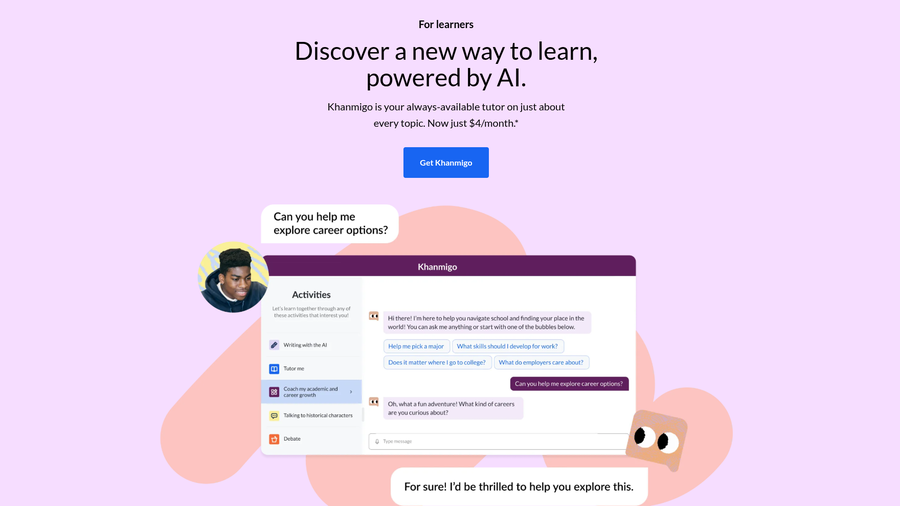
Khanmigo is the AI tutor from Khan Academy, the education nonprofit, and it is the clearest example of a tool designed around learning rather than answers. Khanmigo’s learner page puts it plainly: “Unlike ChatGPT, Khanmigo never gives you the answer.” Instead, it asks questions and nudges you toward the next step, the way a patient tutor would at a whiteboard.
It works on top of Khan Academy’s lessons and practice, which Khan Academy says will always remain free. For college students, that library is most useful in foundational courses where a lot of Chegg traffic came from, such as calculus, statistics and introductory sciences. Khanmigo can also coach your writing with feedback and debate, and it reviews code as you learn JavaScript, HTML, Python and SQL.
The integrity advantage is built in. Because Khanmigo will not produce a finished solution, you are unlikely to paste something into graded work that you do not understand. That makes it a good fit for homework you intend to learn from, and a safe choice when your syllabus allows tutoring but not answer services.
There are limits. Khanmigo is tied to Khan Academy’s content, so it will not know the details of your professor’s custom problem set, and upper-level courses may be beyond its lessons. It is also only available to adult learners in the U.S. with a U.S. billing address, or through a parent account for younger students.
- Pros: Designed to never give final answers, low monthly price, built on free Khan Academy lessons and practice, and help with writing and coding too.
- Cons: U.S. only for paying learners, less useful for upper-level or highly specialized courses, and not aware of your instructor’s specific assignments.
Pricing: $4 a month or $44 a year. Khan Academy’s lessons and practice are free.
2. ChatGPT study mode
Best for: Students who already use ChatGPT and want it to teach rather than solve.
OpenAI added study mode to ChatGPT in July 2025 to answer a question many instructors were asking: how do you use a chatbot to learn instead of to skip the learning? OpenAI describes study mode as a learning experience that “helps you work through problems step by step” rather than handing over the answer. At launch, it was available to logged-in users on Free, Plus, Pro and Team plans. ChatGPT Edu followed.
In practice, study mode asks what you already know, breaks a problem into pieces and checks your understanding along the way. It is useful for the late-night situation the engineering student described. You can talk through a circuits problem, ask why a step works and test yourself before the exam, all without an answer key.
The honest caveat is that study mode is a mode, not a lock. You can switch it off and get a direct answer, which is why your course policy still matters. Many syllabi now spell out whether AI tools are allowed and how to disclose them, so check before you use it on anything graded. It also makes mistakes like any AI model, so treat its explanations as a starting point and confirm them against your notes or textbook.
Used well, it is one of the most flexible free options on this list. It works for almost any subject, it is available at any hour, and it can generate practice questions from your own class notes if you share them.
- Pros: Free with a ChatGPT login, works across nearly every subject, available any time, and designed to guide rather than solve.
- Cons: Easy to switch off, can make mistakes, and may not be allowed for graded work in some courses.
Pricing: Free with a ChatGPT account. Paid ChatGPT plans add higher usage limits.
3. Gemini Guided Learning
Best for: Visual learners and exam prep with flashcards and study guides.
Google introduced Guided Learning in the Gemini app in August 2025. According to Google’s announcement, it helps you “build a deep understanding” rather than collect quick answers, breaking problems down step by step and adapting explanations to your needs. Google rolled out the learning tools for everyone in the Gemini app, including people who do not pay.
Where Gemini stands out is exam preparation. Google says Gemini can create flashcards and study guides from your quiz results or other class materials, and it automatically adds images, diagrams and YouTube videos to explanations of complex topics such as photosynthesis or the parts of a cell. For students who learn better from visuals, that makes review sessions faster and less dry.
Integrity rules are the same as for any AI tool. Use Guided Learning to understand concepts and prepare for tests, not to complete graded assignments your instructor expects you to do alone. Flashcards built from your own notes are one of the safest uses, since they help you remember material you have already been taught.
A simple routine works well before a midterm. Share your lecture notes, ask Guided Learning to quiz you on them, then have it turn the questions you missed into a short study guide. You spend your time on the gaps instead of rereading what you already know.
Google has also run student promotions for its paid plan. In August 2025, it offered students in the U.S. and four other countries a free year of its AI Pro plan, which added more storage and higher limits. Check whether a current student offer applies to you before paying.
- Pros: Free learning mode in the Gemini app, strong flashcard and study guide tools, and built-in images, diagrams and videos.
- Cons: Requires a Google account, can still produce direct answers outside the mode, and AI explanations need checking.
Pricing: Free in the Gemini app. Google AI Pro is an optional paid upgrade, sometimes offered free to students.
4. Wolfram|Alpha Pro
Best for: Math, physics and engineering students who want to check their own work.
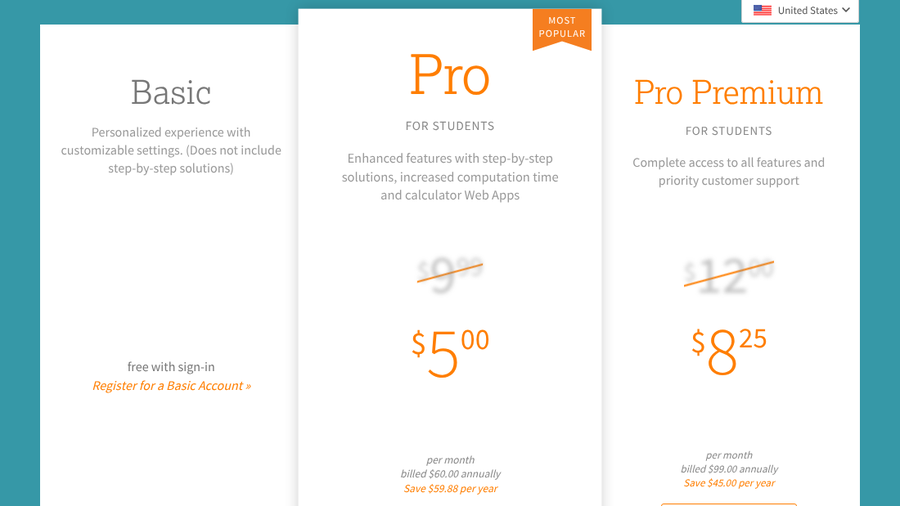
Wolfram|Alpha has been a quiet favorite in STEM courses for years, and it came up again in 2026 threads about life after Chegg. The free version computes answers, while the Pro plans add step-by-step solutions. Wolfram’s student pricing page lists practice problems with hints, guided calculators for calculus, algebra and more, longer computation time and file uploads.

The practice-problem feature is the part most students overlook. Instead of solving your assigned problem, you can generate similar ones and work through them with hints, which builds the skill without touching graded work. That is the difference between checking and copying.
Because Wolfram|Alpha will show full solutions, it needs the most care of anything on this list. Work the problem yourself first, then use the steps to find where you went wrong. Never use it during an exam or quiz unless your instructor has explicitly allowed it, and check if your course policy treats solvers as unauthorized aids for homework.
The free Basic account, available with sign-in, still computes answers and graphs, but Wolfram says it does not include step-by-step solutions. Pro Premium adds more computation time, larger file uploads and priority customer support, which most students will not need.
For engineering students, it is also a practical time-saver for the parts of a problem that are not the point of the exercise, such as simplifying an integral in a physics derivation, when your instructor allows it.
- Pros: Strong math and science engine, practice problems with hints, guided calculators, and cheap student pricing.
- Cons: Shows full solutions, so it is easy to misuse, step-by-step features require a paid plan, and it covers mostly quantitative subjects.
Pricing: Basic is free with sign-in. Student Pro is $9.99 a month or $60 a year, and Student Pro Premium is $12 a month or $99 a year.
5. Tutor.com

Best for: Students who learn best with a real person, especially if their school or library pays.
Sometimes the best alternative to an answer site is a human who can see where your reasoning breaks down. Tutor.com, a service of The Princeton Review, offers 24/7 online tutoring and says it has more than 4,000 expert tutors in over 250 subjects. Sessions happen in an online classroom where you can share a problem and work through it together.
The key detail for students is how you get access. Tutor.com works mainly through partners, including colleges, public libraries, employee benefit programs and U.S. military families. Many students already have free access through their college’s learning center or their local library card and never know it. The site has a “Find My Account” tool to help you locate your program, and it also sells individual subscriptions. Beyond homework help, Tutor.com lists on-demand tutoring and test preparation, which can be worth using before a big midterm.
From an integrity standpoint, human tutoring is the safest category on this list. Tutors are there to coach, not to complete graded work, and most academic integrity policies explicitly allow tutoring. If you are unsure, tell the tutor the assignment is graded and ask them to help you with a similar example instead.
The trade-off is flexibility. You may wait for a tutor in a busy subject, and session quality depends on who you get. Still, for a stuck-on-one-concept evening, a 20-minute session can do more than an hour of scrolling for answers.
- Pros: Real human tutors, available around the clock, a very wide range of subjects, and often free through a college or library.
- Cons: Access depends on your school or library, wait times vary by subject, and tutor quality can be uneven.
Pricing: Free through participating colleges, libraries and military programs. Individual subscriptions are sold separately.
6. OpenStax
Best for: Students who want free, reliable textbooks to learn from and practice with.
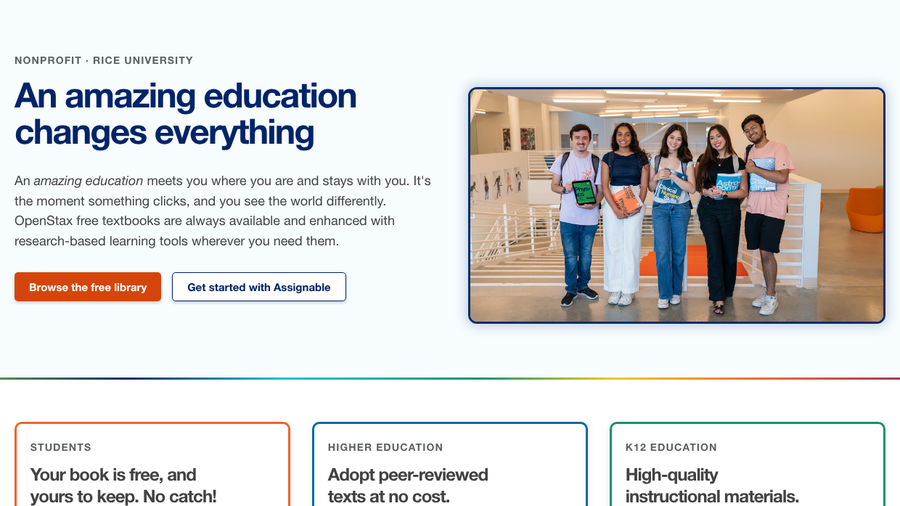
Chegg started as a textbook rental company, and for many students the cheapest fix is still the book itself. OpenStax, a nonprofit at Rice University, publishes free textbooks for college courses. Its student pitch is simple: “Your book is free, and yours to keep. No catch!” You can read on any device or download a copy, with no ads and study tools built in. If your class requires an expensive book or access code, a free OpenStax title can also keep you studying while you wait for financial aid to come through.
For instructors, OpenStax offers peer-reviewed texts at no cost, which is why you may find your course already uses one. If it does not, an OpenStax book in the same subject is still a solid second explanation when your assigned text is confusing, in subjects such as introductory physics, chemistry or economics.
A textbook is the lowest-risk study tool there is. Working through examples and extra exercises in a free book builds the skills your exams test, without any question of unauthorized help. Pair it with one of the tutoring tools above when you get stuck on a specific step.
To find the right book, browse the free library by subject and match its chapters to your syllabus. The table of contents makes it easy to jump to the topic from this week’s lecture and read a second explanation before class.
The limitation is obvious: a book will not respond to your questions. It works best as the foundation, with AI or human tutoring layered on top for the moments you need an explanation tailored to you.
- Pros: Completely free, peer-reviewed for college courses, available on any device or as a download, and no ads.
- Cons: Not interactive, may not match your assigned textbook’s chapter order, and covers mainly introductory courses.
Pricing: Free.
How to use any study tool without an integrity problem
- Read your syllabus first. Look for rules on AI tools, solvers, collaboration and tutoring, and follow the strictest one that applies.
- Never paste live exam or quiz questions. Chegg’s own Honor Code treats asking questions that are part of an exam or graded work as misuse.
- Attempt the problem before you check it. Use tools to find your mistake, not to replace your first try.
- Disclose when required. If your course asks you to note AI help, say which tool you used and how.
- Keep your work history. Drafts, notes and chat logs help if your work is ever questioned.
If your courses use proctored exams, our guide to lockdown browser on Chromebooks and Windows laptops covers the setup side too.
How We Chose These
We looked for tools that help college students understand coursework rather than supply finished answers, since that is what separates study help from an integrity risk. We favored options built to guide, such as tutoring modes that ask questions, practice problems with hints and live human coaching. We weighed price and free access, including programs available through colleges and libraries, and how broadly each tool covers common first- and second-year courses. We also considered how easy each tool is to misuse and noted where extra care is needed. Pricing and features were checked against each provider’s own pages in fall 2026.
The Bottom Line
For guided homework help that will not hand you answers, start with Khanmigo or ChatGPT study mode. Use Gemini Guided Learning for exam prep and Wolfram|Alpha Pro only to check work you have already attempted. Before paying for anything, ask your college or library about free Tutor.com access, and grab a free OpenStax textbook for a second explanation.
Frequently Asked Questions
What is the best Chegg alternative?
The best Chegg alternative for honest study help is Khanmigo, because it is designed to guide you without giving final answers. ChatGPT study mode is the best free option, and Tutor.com is best if you want a human tutor.
Is using Chegg cheating?
Using Chegg is not automatically cheating, but using its answers on exams or graded work violates Chegg’s own Honor Code and most college integrity policies. Using it to study concepts may be allowed, so check your syllabus.
Can professors find out if you used Chegg?
Professors and college officials can request an honor code investigation from Chegg. Chegg says it provides the time and date a question and its solution were posted, without sharing personal information.
Are there free sites like Chegg?
Free alternatives include ChatGPT study mode, Gemini Guided Learning, OpenStax textbooks and Khan Academy’s lessons and practice. Many students also get free Tutor.com sessions through their college or public library.
Is ChatGPT study mode allowed in college?
Whether ChatGPT study mode is allowed depends on your course. Some instructors permit AI tools for studying but not for graded work, and some require you to disclose any use, so read the syllabus before you rely on it.
Related Posts